Shaders + HDR
CurseForgeEnable native HDR in Minecraft with Iris shaders
A minecraft mod that enables native HDR on Windows / macOS / Linux with Iris shaders.
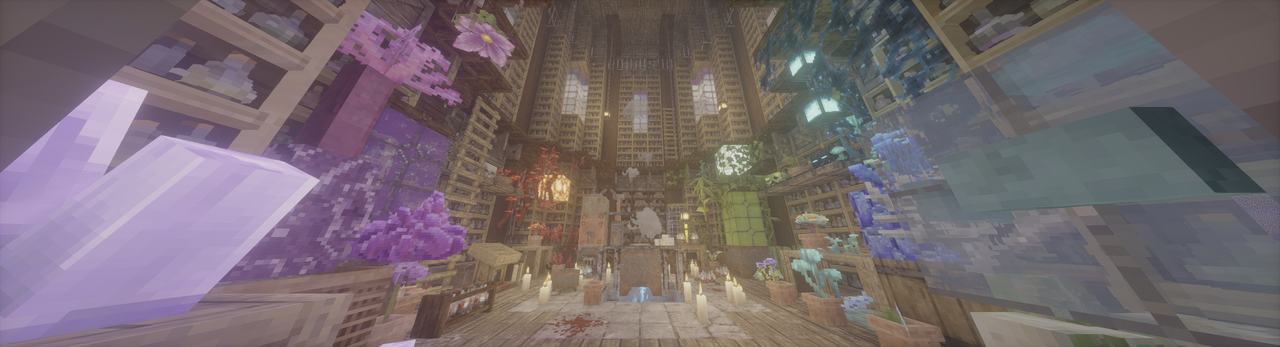 (Photon patched to HDR w/ Patrix, taken by mod's screenshot feature.)
What the mod have achieved
- Native HDR, both for scRGB and HDR10/PQ.
- UI color correction by a new render pass.
- Ingame config using Cloth Config API.
- Ingame HDR screenshot.
- Replay Mod HDR Video Export (need custom FFmpeg commandline, which can be found in config menu)
- Near full Wayland IME fix (need latest IMBlocker).
For Users
- See XgarhontX's temporary patches for HDR output and tonemapping on select shaderpacks with support for this mod: Google Sheets
- See some pics here: Wiki
- Adjust HDR Brightness values (Paper White, UI, Peak) with config menu. (Default keybind: F9)
- Take a HDR screenshot ingame. (Default keybind: F10)
- Supported platforms:
- Windows: Nvidia/AMD GPU generally run flawlessly. Intel GPU is supported since v2.1.0 with a DXGI fallback path and there's performance degradation (more info in v2.1.0 release note).
- Linux Wayland: AMD/Intel GPU generally run flawlessly. People using Nvidia GPU may encounter some problems/crashes, see the troubleshooting for a potential workaround.
- macOS: Supported but need more testing, bugs are expected. Also, shaderpack support on macOS is limited.
- Android/iOS: Not supported. If Mobile launcher developers are interested in the project, my glfw fork can be a starting point for HDR support in the future.
- Troubleshooting:
- ReShade is currently not compatible under default settings, failing to load and breaking sky.
- Enabling "Force Activate OpenGL-DirectX Interop" in config/advanced can improve compatibility with SpecialK and ReShade. Please make sure they only inject into DirectX 11 layer.
- Mods also messing with GLFW may be incompatible.
- If your game is too bright/dark, try to adjust the custom brightness values yourself.
- If you're on Windows, don't forget to install the latest Visual C++ Redistributable.
- If your game crashes on NeoForge/Forge, disable
earlyWindowControlin<game folder>/config/fml.toml - If HDR is broken when shaders are enabled, please reset "Colorspace" setting in Iris/Oculus to "sRGB".
- Clean temp file if your game doesn't start or some features are broken (path can be found in log, %TEMP%/glfw on Windows and /tmp/glfw on Linux).
- For Linux Nvidia users, if your game can't start here's a potential workaround (using Zink, so performance degradation is expected):
- Use these environment variables:
export __GLX_VENDOR_LIBRARY_NAME=mesa export __EGL_VENDOR_LIBRARY_FILENAMES=/run/opengl-driver/share/glvnd/egl_vendor.d/50_mesa.json export MESA_LOADER_DRIVER_OVERRIDE=zink export GALLIUM_DRIVER=zink - ONLY WORKS ON Mesa >= 26.0.0. Lower versions crash your game due to the lack of This PR.
- Use these environment variables:
- ReShade is currently not compatible under default settings, failing to load and breaking sky.
For Shader Packs
Wiki Tutorial
Macros
HDR_MOD_INSTALLEDHDR_ENABLED
Uniforms
float HdrGameMinimumBrightness;float HdrGamePeakBrightness;float HdrGamePaperWhiteBrightness;float HdrUIBrightness;
Use these uniforms inside #if HDR_MOD_INSTALLED block.
Output
the output of the shader(aka. what is written to main render target in final pass) should have ext sRGB encoding(Rec.709 primaries, sRGB (for negative numbers use −f(−x)) transfer function), and you should not use RGBA8F for scene color.
Credits
- Tom94, for glfw fork with color management;
- IMS212, for Iris shaders and original glfw patch idea;
- XgarhontX, for working on RenoDX Minecraft HDR and shader patches, and helping me to make color transform correct;
- moyongxin and CommandGenius, for improving the mod's compatibility;
- LitnhJacuzzi, for correct IMBlocker compatibility.
Copyright
The main HDR Mod repo is licensed under MIT. Bundled GLFW from Tom94's/mine fork is licensed under the zlib/libpng license.
Star History
Versions
FAQ
Comment installer Shaders + HDR ?
Téléchargez le fichier pour votre version de Minecraft et votre loader sur cette page, puis placez le .jar dans le dossier mods (ou plugins) et lancez le jeu.
Shaders + HDR est-il gratuit ?
Shaders + HDR est gratuit sur Modgrid — nous renvoyons directement vers la source officielle, sans paywall.
Quelles versions de Minecraft Shaders + HDR prend-il en charge ?
Compatible avec Neoforge, Fabric. La liste des versions et loaders pris en charge est dans la section de téléchargement de cette page.
Commentaires 0
Aucun commentaire pour l'instant. Sois le premier à donner ton avis.