WorldEdit Structure Selector
CurseForgeAuto select any structures as a WorldEdit selection
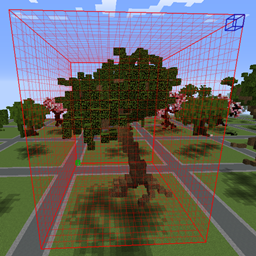
Auto selects any structures as a WorldEdit cuboid selection.
This is a useful tool for saving .schematic file with WorldEdit or creating BO3 file with BO3Tools for TerrainControl
Dependency
This plugin must be used in conjunction with WorldEdit or creating BO3 file with BO3Tools for TerrainControl
Commands :
- /wss : Display the status of the plugin
- /wss [help] : Display wss help
- /wss [enable|on] : Enable wss
- /wss [disable|off] : Disable wss
- /wss [reload] : Reload wss
- /wss [maxX] : Maximum length on X axis
- /wss [maxY] : Maximum length on Y axis
- /wss [maxZ] : Maximum length on Z axis
- /wss [exclude] : Excluded materials (like DIRT,GRASS or even 1,1:1,WOOL) from selection
Permissions :
- wss.admin : The only permission to be able to use this plugin. defualt to OP.
Config :
The plugin use metrics and an integrated updater.
Both can be disabled in config.yml
How to use WSS :
- Enable it : /wss enable
- Get the WorldEdit wand : //wand
- Left click on your structure. By default, the selection size is defined to 32 x 32 x 32 but it can easily be changed in the config.yml or in game.


Want to have this cool selection in game?
use WorldEditCUI Forge Edition or WorldEditCUI Forge Edition 2
Versionen
FAQ
Wie installiere ich WorldEdit Structure Selector?
Lade die Datei für deine Minecraft-Version und deinen Loader auf dieser Seite herunter, lege die .jar in den mods- (oder plugins-) Ordner und starte das Spiel.
Ist WorldEdit Structure Selector kostenlos?
WorldEdit Structure Selector ist auf Modgrid kostenlos — wir verlinken direkt zur offiziellen Quelle, ohne Paywall.
Welche Minecraft-Versionen unterstützt WorldEdit Structure Selector?
Die unterstützten Versionen und Loader findest du im Download-Bereich dieser Seite.
Kommentare 0
Noch keine Kommentare. Sei der Erste, der seine Meinung teilt.