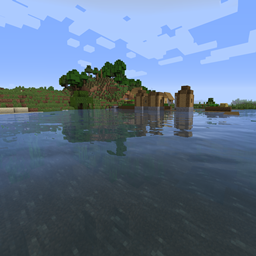
Sildur's Enhanced Default Shaders
CurseForgeImproves the look of vanilla MC with shadows, reflections and more. Runs on any Potato!

Sildur's Enhanced Default Shaders
Official Website & Changelogs | Patreon Support
Vibrant Shaders | Basic Shaders
About:
Enhanced Default does what the name indicates. Instead of completely revamping the style of the game, it maintains the vanilla look and adds shadows, reflections, TAA, and even godrays. It's very lightweight and highly customizable, so even the worst potato is able to run it. It has a Fast and Fancy profile setting in the in-game shader options as well as download presets. Fast is quite a lot faster than the Fancy preset, so if you need all the frames, go for Fast instead!
Compatibility:
- Support for Distant Horizons and Voxy
- Minecraft Versions: 1.7.10 up to the latest release
- Supports: Iris and OptiFine
How to Install via Iris:
- Download and run the Iris Installer.
- Select "Iris and Sodium", choose your Minecraft version, and install.
- Open the Minecraft Launcher and select the new Iris profile.
- Launch the game, go to Options -> Video Settings -> Shader Packs.
- Click "Open Shader Pack Folder" and drop the Sildur's Shaders .zip file inside.
- Select the pack from the in-game list.
How to Install via OptiFine:
- Download and run the official OptiFine jar file to create an OptiFine profile.
- Open the Minecraft Launcher and select the new OptiFine profile.
- Launch the game, go to Options -> Video Settings -> Shaders.
- Click "Shaders Folder" at the bottom of the screen.
- Drop the Sildur's Shaders .zip file inside and select it in-game.
Permissions:
You are not allowed to edit, copy code, or redistribute this shaderpack under a different name or claim it as yours.
Modpack Policy:
Permission is not required for modpacks hosted on CurseForge or Modrinth. You may freely add this shaderpack as long as you use the platform's built-in system. Do not bundle or re-host the raw .zip file inside your project download.
Socials & Support:
Versions
FAQ
Comment installer Sildur's Enhanced Default Shaders ?
Téléchargez le fichier pour votre version de Minecraft et votre loader sur cette page, puis placez le .jar dans le dossier mods (ou plugins) et lancez le jeu.
Sildur's Enhanced Default Shaders est-il gratuit ?
Sildur's Enhanced Default Shaders est gratuit sur Modgrid — nous renvoyons directement vers la source officielle, sans paywall.
Quelles versions de Minecraft Sildur's Enhanced Default Shaders prend-il en charge ?
La liste des versions et loaders pris en charge est dans la section de téléchargement de cette page.
Commentaires 0
Aucun commentaire pour l'instant. Sois le premier à donner ton avis.