Language

CalcMod

CalcMod

Modrinth

A calculator in your chat with shortcuts designed for Minecraft

2.9M downloads 748 followers updated 4d ago
latest v1.5.2+paper.26.2 Modrinth
Fabric Forge Neoforge Paper Quilt 1.12.2 – 26.2 Utility

CalcMod Logo GitHub Modrinth
CurseForge

Bring the power of calculation to your Minecraft chat with CalcMod! Enjoy features from simple calculations to advanced tools for optimizing gameplay.


|/calc 3+(28/8)^2|
|:-:|
|Basic calculation response|

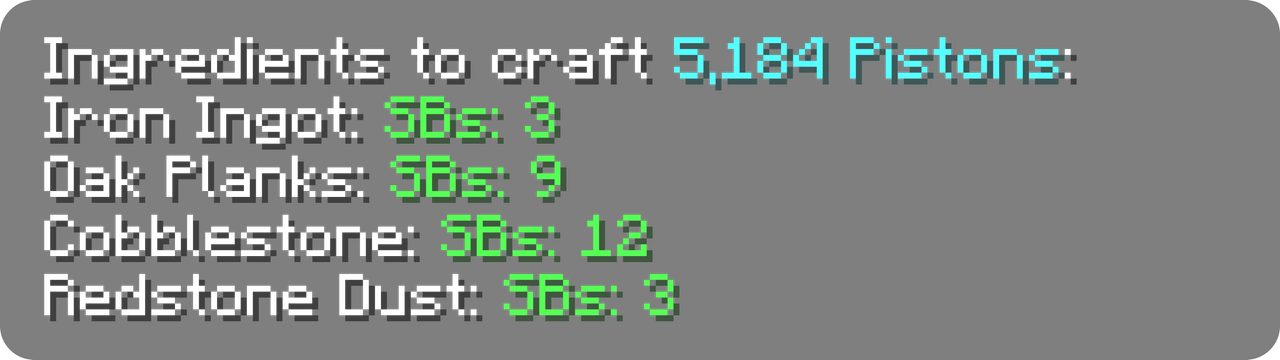
|/calc craft piston 3 sb|
|:-:|
|Craft command response|

|/calc nether ~ ~ ~|
|:-:|
|Nether command response|


Click any green text to copy it to your clipboard!

🔄 Compatibility

CalcMod supports Fabric, Forge, Quilt, Paper, and NeoForge mod loaders, down to Minecraft version 1.12.

CalcMod can be installed on both the client and server, and also works on clients without requiring servers to have the mod (and vice versa.)

✅ Features:

See a few examples in gallery

🔢 Simple Calculator

An intuitive calculator with some handy variables. To see a list of variables run /calc variables.

Supported Operators

| Symbol(s) | Syntax | Operation |
|:-------------:|:----------:|:----------------------:|
| + | a+b | Addition |
| – | a–b | Subtraction |
| * , × , ∙ | a*b | Multiplication |
| / , : , ÷ | a/b | Division |
| ^ | a^b | Exponentiation (power) |
| ! | n! | Factorial |
| # | a#b | Modulo |
| % | x% | Percentage |
| ^^ | a^^b | Tetration |
| √ | √x | Square root |
| ∛ | ∛x | Cube root |
| ∜ | ∜x | Fourth root |

CalcMod has some more advanced functions and variables that can be used within expressions in this spreadsheet.

Usage: /calc <expression>

📦 Storage Utils

When given a rate of items per hour (expressions allowed), returns the minimum number of item sorters needed to sort in time.
Additional input for multiple times hopper speed sorters, and a separate command for Allay based non stackable sorters.

Usage: /calc storage <itemsPerHour>
Usage: /calc storage <timesHopperSpeed> <numberOfItems>
Usage: /calc allaystorage <itemsPerHour>

🛠️ Crafting Utils*

When given an amount of a recipe to craft (expressions allowed), returns all the items required to craft that quantity of the recipe.

(CalcMod 1.3.2+) The optional depth argument specifies how many levels of recursive crafting to perform on the recipe. Default depth is 1.

Usage: /calc craft <item> <amount>
Usage: /calc craft <item> <depth> <amount>

(New!) When the craftinv command is given an item, it returns the maximum number of that item the player can craft using their current inventory (including items in shulker boxes).

Usage: /calc craftinv <item>

(Minecraft 1.21.3+) Due to Minecraft's crafting system updates, CalcMod's craft command can now only use recipes unlocked in the user's recipe book in single player mode.

🌐 Portal Linking Coords

When given a block position, returns the dimension in the command's corresponding coordinates. If no coordinates are given, command assumes current player position.

Usage: /calc nether <x> <y> <z>
Usage: /calc overworld <x> <y> <z>

🌾 Farm Rates Calculator

When given an amount of items and a farm run time in seconds (expressions allowed), returns the items per hour of the farm.

Usage: /calc rates <numberOfItems> <seconds>

🎲 Generate Random Number

When given a maximum and/or minimum value, returns a random number between those values (inclusive). If just a maximum value is entered, picks a random number from 0 to the max value (inclusive).

Usage:/calc random <max>
Usage: /calc random minmax <min> <max>

💪 Comparator Power Level Finder

When given a container and a desired comparator power level (expressions allowed), returns the number of items needed to achieve that power level.

Usage: /calc signaltoitems <container> <powerLevel>

🐷 Piglin Bartering Utils

Calculates the average number of gold ingots needed to barter for a specific quantity of a desired item (togold), or the average number of a desired item received when bartering a specific number of gold ingots (toitem).

Usage: /calc barter togold <numberOfItems> <item>
Usage: /calc barter toitem <amountOfGold> <item>

🧭 Travel Distance Evaluator

When given two block positions, returns the distance between them. If only one position is given, uses player's location. The 3D mode provides distance including height (y coord).

Usage: /calc dist <x1> <y1> <z1>
Usage: /calc dist <x1> <y1> <z1> <x2> <y2> <z2>
Usage: /calc dist 3d <x1> <y1> <z1>
Usage: /calc dist 3d <x1> <y1> <z1> <x2> <y2> <z2>

🧮 Custom Functions

Custom functions are reusable commands that perform a specific computation. Custom functions can be run in any number field formatted with the function name and its parameters in parentheses functionName(<param1>, ...,<paramN>).

Creating a Function:
Custom functions can have any number of parameters, specified in [square] brackets when adding a function.

|⚠️ Using any numbers, special characters, or variables in a parameter may result in a broken function.|
|:-:|

e.g. /calc custom add blockstoingots [numBlocks]*9

| /calc blockstoingots(72) |
|:-:|
| Custom function response |

Usage: /calc custom add <functionName> <function>
Usage: /calc custom run <functionName> <input>
Usage: /calc <functionName>(<parameters>)
Usage: /calc custom list
Usage: /calc custom remove <functionName>

➡️ Converters:

Shulker Boxes ↔ Items

When given an amount of full shulker boxes (expressions allowed), returns the number of items they contain, or vice versa.

Usage: /calc itemtosb <numberOfItems>
Usage: /calc sbtoitem <numberOfSbs>

Items ↔ Stacks:

When given an amount of stacks (expressions allowed), returns the number of items in those stacks, or vice versa.

Usage: /calc itemtostack <numberOfItems>
Usage: /calc stacktoitem <numberOfStacks>

Seconds → Hopper Clock Items

When given a time in seconds (expressions allowed) returns the number of items to put in a hopper clock to achieve that time.
Uses formula and hopper clock from hoppertimer.net.

Hopper clock

Usage: /calc secondstohopperclock <seconds>

Seconds → Repeater Delay

When given a time in seconds (expressions allowed), returns the number of repeaters and their delays to achieve that time.

Usage: /calc secondstorepeater <seconds>

❎ Variables

Variables can be used inside commands in any number field. They act as shortcuts instead of having to remember that "a double chest full of 16 stackable items is 864."
If no stack size is given, variables default to the contextualized stack size in each command.

Constant Variables

| Name | Value |
|----------|---------------|
| dub | 3456 (default)|
| dub64 | 3456 |
| dub16 | 864 |
| dub1 | 54 |
| sb | 1728 (default)|
| sb64 | 1728 |
| sb16 | 432 |
| sb1 | 27 |
| stack | 64 (default) |
| stack64 | 64 |
| stack16 | 16 |
| stack1 | 1 |
| min | 60 |
| h | 3600 |

There are some extra less Minecraft specific variables listed in this spreadsheet

Dynamic Variables Dynamic variables change depending on an in-game status. These can be particularly useful inside custom functions.

| Name | Value |
|----------|----------------|
| x | player x coord |
| y | player y coord |
| z | player z coord |
| health | player health |


Supported Operators

| Symbol(s) | Syntax | Operation |
|:-------------:|:----------:|:----------------------:|
| + | a+b | Addition |
| – | a–b | Subtraction |
| * , × , ∙ | a*b | Multiplication |
| / , : , ÷ | a/b | Division |
| ^ | a^b | Exponentiation (power) |
| ! | n! | Factorial |
| # | a#b | Modulo |
| % | x% | Percentage |
| ^^ | a^^b | Tetration |
| √ | √x | Square root |
| ∛ | ∛x | Cube root |
| ∜ | ∜x | Fourth root |

CalcMod has some more advanced functions and variables that can be used within expressions in this spreadsheet.

Usage: /calc <expression>

📦 Storage Utils

When given a rate of items per hour (expressions allowed), returns the minimum number of item sorters needed to sort in time.
Additional input for multiple times hopper speed sorters, and a separate command for Allay based non stackable sorters.

Usage: /calc storage <itemsPerHour>
Usage: /calc storage <timesHopperSpeed> <numberOfItems>
Usage: /calc allaystorage <itemsPerHour>

🛠️ Crafting Utils

When given an amount of a recipe to craft (expressions allowed), returns all the items required to craft that quantity of the recipe.

(CalcMod 1.3.2+) The optional depth argument specifies how many levels of recursive crafting to perform on the recipe. Default depth is 1.

(Minecraft 1.21.3+) Due to Minecraft's crafting system updates, CalcMod's craft command can now only use recipes unlocked in the user's recipe book in single player mode.

Usage: /calc craft <item> <amount>
Usage: /calc craft <item> <depth> <amount>

🌐 Portal Linking Coords

When given a block position, returns the dimension in the command's corresponding coordinates. If no coordinates are given, command assumes current player position.

Usage: /calc nether <x> <y> <z>
Usage: /calc overworld <x> <y> <z>

🌾 Farm Rates Calculator

When given an amount of items and a farm run time in seconds (expressions allowed), returns the items per hour of the farm.

Usage: /calc rates <numberOfItems> <seconds>

🎲 Generate Random Number

When given a maximum and/or minimum value, returns a random number between those values (inclusive). If just a maximum value is entered, picks a random number from 0 to the max value (inclusive).

Usage:/calc random <max>
Usage: /calc random minmax <min> <max>

💪 Comparator Power Level Finder

When given a container and a desired comparator power level (expressions allowed), returns the number of items needed to achieve that power level.

Usage: /calc signaltoitems <container> <powerLevel>

🐷 Piglin Bartering Utils

Calculates the average number of gold ingots needed to barter for a specific quantity of a desired item (togold), or the average number of a desired item received when bartering a specific number of gold ingots (toitem).

Usage: /calc barter togold <numberOfItems> <item>
Usage: /calc barter toitem <amountOfGold> <item>

🧭 Travel Distance Evaluator (New!)

When given two block positions, returns the distance between them. If only one position is given, uses player's location. The 3D mode provides distance including height (y coord).

Usage: /calc dist <x1> <y1> <z1>
Usage: /calc dist <x1> <y1> <z1> <x2> <y2> <z2>
Usage: /calc dist 3d <x1> <y1> <z1>
Usage: /calc dist 3d <x1> <y1> <z1> <x2> <y2> <z2>

🧮 Custom Functions

Custom functions are reusable commands that perform a specific computation. Custom functions can be run in any number field formatted with the function name and its parameters in parentheses functionName(<param1>, ...,<paramN>).

Creating a Function:
Custom functions can have any number of parameters, specified in [square] brackets when adding a function.

|⚠️ Using any numbers, special characters, or variables in a parameter may result in a broken function.|
|:-:|

e.g. /calc custom add blockstoingots [numBlocks]*9

| /calc blockstoingots(72) |
|:-:|
| Custom function response |

Usage: /calc custom add <functionName> <function>
Usage: /calc custom run <functionName> <input>
Usage: /calc <functionName>(<parameters>)
Usage: /calc custom list
Usage: /calc custom remove <functionName>

➡️ Converters:

Shulker Boxes ↔ Items

When given an amount of full shulker boxes (expressions allowed), returns the number of items they contain, or vice versa.

Usage: /calc itemtosb <numberOfItems>
Usage: /calc sbtoitem <numberOfSbs>

Items ↔ Stacks:

When given an amount of stacks (expressions allowed), returns the number of items in those stacks, or vice versa.

Usage: /calc itemtostack <numberOfItems>
Usage: /calc stacktoitem <numberOfStacks>

Seconds → Hopper Clock Items

When given a time in seconds (expressions allowed) returns the number of items to put in a hopper clock to achieve that time.
Uses formula and hopper clock from hoppertimer.net.

Hopper clock

Usage: /calc secondstohopperclock <seconds>

Seconds → Repeater Delay

When given a time in seconds (expressions allowed), returns the number of repeaters and their delays to achieve that time.

Usage: /calc secondstorepeater <seconds>

❎ Variables

Variables can be used inside commands in any number field. They act as shortcuts instead of having to remember that "a double chest full of 16 stackable items is 864."
If no stack size is given, variables default to the contextualized stack size in each command.

Constant Variables

| Name | Value |
|----------|---------------|
| dub | 3456 (default)|
| dub64 | 3456 |
| dub16 | 864 |
| dub1 | 54 |
| sb | 1728 (default)|
| sb64 | 1728 |
| sb16 | 432 |
| sb1 | 27 |
| stack | 64 (default) |
| stack64 | 64 |
| stack16 | 16 |
| stack1 | 1 |
| min | 60 |
| h | 3600 |

There are some extra less Minecraft specific variables listed in this spreadsheet

Dynamic Variables Dynamic variables change depending on an in-game status. These can be particularly useful inside custom functions.

| Name | Value |
|----------|----------------|
| x | player x coord |
| y | player y coord |
| z | player z coord |
| health | player health |


Versions

Release
1.5.2+paper.26.2
paper · 26.2 · 4d ago
- Updated 26.2
304
Release
1.5.2+neoforge.26.2
neoforge · 26.2 · 18d ago
- Updated to Neoforge 26.2!
225
Release
1.5.2+forge.26.2
forge · 26.2 · 18d ago
- Updated to Forge 26.2
69
Release
1.5.2+fabric.26.2
fabric, quilt · 26.2 · 1mo ago
-Updated to 26.2 - Other loaders coming soon!
139.0k
Release
1.5.1+paper.26.1
paper · 26.1, 26.1.1, 26.1.2 · 2mo ago
Updated to Minecraft 26.1
3.8k
Release
1.5.1+neoforge.26.1
neoforge · 26.1, 26.1.1, 26.1.2 · 2mo ago
- Ported to Neoforge
284
Release
1.5.1+forge.26.1
forge · 26.1.2 · 2mo ago
- Updated to 26.1.2
229
Release
1.5.1+fabric.26.1
fabric, quilt · 26.1, 26.1.1, 26.1.2 · 2mo ago
- Fixes server crash on launch.
62.3k
Release
1.5.0+fabric.26.1
fabric · 26.1, 26.1.1, 26.1.2 · 4mo ago
- Updated to 26.1
163.9k
Release
1.5.0+paper.1.21.9+
paper · 1.21.9, 1.21.10, 1.21.11 · 4mo ago
- Added craftinv command - tells how many of a given item you can craft with whats in your inventory. - Fixed a glitch that allowed recursive custom functions.
7.4k
Release
1.5.0+fabric.1.21.9+
fabric, quilt · 1.21.9, 1.21.10, 1.21.11 · 4mo ago
- Added craftinv command - tells how many of a given item you can craft with whats in your inventory. - Fixed a glitch that allowed recursive custom functions.
168.9k
Release
1.4.3
paper · 1.21.9, 1.21.10 · 9mo ago
- Updated to 1.21.9 & 1.21.10. - Fixed issues with Craft.
7.7k

Comments 0

No comments yet. Be the first to share your thoughts.

FAQ

How do I install CalcMod?

Download the file for your Minecraft version and loader from this page, then drop the .jar into your mods (or plugins) folder and launch the game.

Is CalcMod free?

CalcMod is free to download on Modgrid — we link straight to the official source, no paywall or bundled installer.

Which Minecraft versions does CalcMod support?

Works with Fabric, Forge, Neoforge, Paper. Supports versions 1.12.2–26.2. See the download section on this page for the full list of supported versions and loaders.

Download CalcMod

R 1.5.2+paper.26.2 26.2 paper 413 KB R 1.5.2+neoforge.26.2 26.2 neoforge 544 KB R 1.5.2+forge.26.2 26.2 forge 525 KB R 1.5.2+fabric.26.2 26.2 fabric, quilt 635 KB R 1.5.1+paper.26.1 26.1, 26.1.1, 26.1.2 paper 413 KB R 1.5.1+neoforge.26.1 26.1, 26.1.1, 26.1.2 neoforge 544 KB R 1.5.1+forge.26.1 26.1.2 forge 525 KB R 1.5.1+fabric.26.1 26.1, 26.1.1, 26.1.2 fabric, quilt 634 KB R 1.5.0+fabric.26.1 26.1, 26.1.1, 26.1.2 fabric 624 KB R 1.5.0+paper.1.21.9+ 1.21.9, 1.21.10, 1.21.11 paper 411 KB R 1.5.0+fabric.1.21.9+ 1.21.9, 1.21.10, 1.21.11 fabric, quilt 621 KB R 1.4.3 1.21.9, 1.21.10 paper 406 KB R 1.4.3+fabric.1.21.9+ 1.21.9, 1.21.10, 1.21.11 fabric 615 KB R 1.4.2 1.21.6 forge 518 KB R 1.4.2+fabric.1.21.6-1.21.8 1.21.6, 1.21.7, 1.21.8 fabric, quilt 615 KB R 1.4.2 1.21.5, 1.21.6, 1.21.7 paper 406 KB R 1.4.2 1.21.5 forge 518 KB R 1.4.2 1.21.4 forge 518 KB R 1.4.2+fabric.1.21.5 1.21.5 fabric, quilt 615 KB R 1.4.1+fabric.1.21.5 1.21.5 fabric, quilt 615 KB R 1.3.3+fabric.1.21.3-1.21.4 1.21.3, 1.21.4 fabric, quilt 608 KB R 1.3.2+fabric.1.21.1-1.21.2 1.21, 1.21.1, 1.21.2 fabric, quilt 605 KB B 1.3.2-beta+fabric.1.20.6 1.20.6 fabric 605 KB R fabric-1.20.2-1.3.1 1.20.2, 1.20.3, 1.20.4 fabric, quilt 585 KB R 1.3.0 1.12.2 forge 489 KB R 1.3.0 1.13, 1.13.1, 1.13.2 forge 514 KB R 1.3.0 1.14, 1.14.1, 1.14.2 forge 514 KB R 1.3.0 1.15, 1.15.1, 1.15.2 forge 514 KB R 1.3.0 1.16, 1.16.1, 1.16.2 forge 514 KB R 1.3.0 1.17, 1.17.1 forge 514 KB R 1.3.0 1.18, 1.18.1, 1.18.2 forge 514 KB R 1.3.0 1.19, 1.19.1, 1.19.3 forge 514 KB R 1.3.0 1.20, 1.20.1, 1.20.2 forge 516 KB R fabric-1.14.4-1.3.0 1.14, 1.14.1, 1.14.2 fabric 397 KB R fabric-1.15.2-1.3.0 1.15, 1.15.1, 1.15.2 fabric 396 KB R fabric-1.16.5-1.3.0 1.16, 1.16.1, 1.16.2 fabric 426 KB R fabric-1.17.1-1.3.0 1.17, 1.17.1 fabric 427 KB R fabric-1.18.2-1.3.0 1.18, 1.18.1, 1.18.2 fabric 586 KB R fabric-1.19.2-1.3.0 1.19, 1.19.1, 1.19.2 fabric 577 KB R fabric-1.19.4-1.3.0 1.19.3, 1.19.4 fabric, quilt 587 KB R fabric-1.20.x-1.3.0 1.20, 1.20.1 fabric, quilt 586 KB R 1.19.2-1.2.0 1.19, 1.19.1, 1.19.2 fabric, quilt 578 KB R 1.2.0 1.20, 1.20.1 fabric, quilt 585 KB R 1.1.0 1.19, 1.19.1, 1.19.2 fabric 571 KB A 1.0.0 1.19, 1.19.1 fabric 13.0 MB

Files are served directly from the original source. Modgrid does not host or modify them.