
Complementary Shaders - Unbound
ModrinthTransforming the visuals of Minecraft with exceptional quality, detail, and performance.

About
Complementary Shaders is a shader pack for Minecraft Java Edition with exceptional attention to detail, high standards of quality, and top tier optimisation. It offers a ton of high quality effects, two default visual style choices, custom effects for almost every block in the game, profiles ranging from Potato to Ultra and it's designed to never be obstructive during gameplay. It started as an edit of BSL Shaders in 2018, and it received countless major updates including a complete rewrite to meet the standards of our community. Complementary Shaders is dedicated to be shaped by user feedback over anything else, and it still receives regular updates to this day.
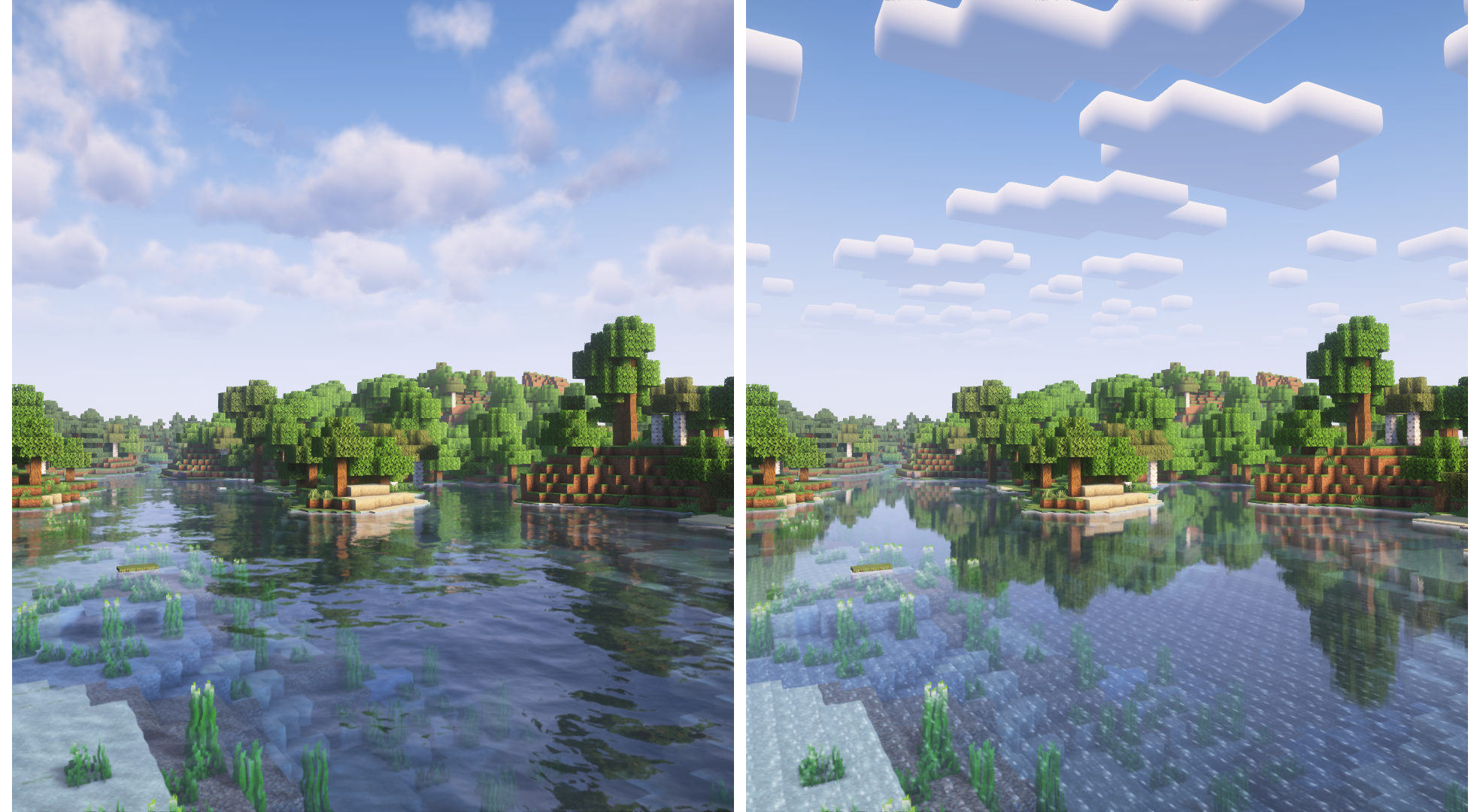
"Unbound" is one of the two default styles Complementary Shaders r5 comes with. It is the less restricted style of Complementary that aims for a more realistic image. Learn more about the two styles here.
Choose Your Style
Complementary Shaders comes with two distinct visual style options. The only difference between these two styles is the default settings. The Unbound style is designed for people looking for a more realistic experience, while the Reimagined style is made to reimagine Minecraft while preserving its unique visual elements. Please note that you can still customize everything after you download either style. You can switch to blocky clouds on the Unbound style, or use realistic water on the Reimagined style. All settings are located in Shader Options.
-------------------- Unbound Style ---------------------------------------- Reimagined Style --------------------
Installation
New: You can just download the Complementary Installer and click Install to automatically do all the steps below.
- First you need to install the Iris mod to be able to load shaderpacks.
- Then you need to launch the game, and get to the Shaderpacks/Shaders menu in Video Settings.
- Open the shaderpacks folder by clicking the button in the menu.
- Download Complementary Shaders and put it in the shaderpacks folder. (Please don't unzip the file)
- Get back in the game, and choose Complementary in the shaderpacks menu. (Refresh the menu if it doesn't appear)
Other
- Check out the Complementary Development Website for more information.
- Join the Complementary Discord community if you have any questions, or just want to talk.
- If you would like to support the development of Complementary, you can do so on Patreon.
Версії
FAQ
Як встановити Complementary Shaders - Unbound?
Завантажте файл під свою версію Minecraft і завантажувач із цієї сторінки, потім покладіть .jar у папку mods (або plugins) і запустіть гру.
Complementary Shaders - Unbound безкоштовний?
Complementary Shaders - Unbound можна завантажити безкоштовно на Modgrid — ми ведемо прямо до офіційного джерела.
Які версії Minecraft підтримує Complementary Shaders - Unbound?
Працює з Iris, Optifine. Підтримуються версії 1.7.2–26.3. Перелік підтримуваних версій і завантажувачів — у блоці завантаження на цій сторінці.
Коментарі 0
Поки немає коментарів. Будь першим, хто поділиться думкою.