
EaseonCS - Core
ModrinthA client-side core that serves as the shared foundation for all Easeon modules.
1.1k downloads 1 followers updated 2mo ago
🌿 Easeon
Overview
A client-side core that serves as the shared foundation for all Easeon modules, freely available for any mod to reference and use.
Example
Spoiler
Feature Definition
package com.example;

import com.easeon.cs.core.api.EaseonFeatureEnumLike;
import com.easeon.cs.core.config.model.*;

public enum FeatureExample implements EaseonFeatureEnumLike {
    // ✅ Toggle Example: Enable or disable the minimap
    SHOW_MINIMAP("featuredemo.show_minimap",
            new ToggleConfig() {{ Enabled = true; }}),

    // ✅ Slider Example: Adjust screen brightness (1–10)
    SCREEN_BRIGHTNESS("featuredemo.screen_brightness",
            new SliderConfig() {{ Enabled = true; Value = 5; }}, 1, 10) {
        @Override public String getValueFormat() { return "featuredemo.screen_brightness.format"; }
    },

    // ✅ Hotkey Example: Toggle fullscreen with a shortcut
    TOGGLE_FULLSCREEN("featuredemo.toggle_fullscreen",
            new HotkeyConfig() {{ Enabled = true; Key = 70; Mod = 2; }}); // Example: Ctrl + F

    private final String title;
    private final Object defaultConfig;
    private final int min, max;

    FeatureExample(String title, Object defaultConfig) { this(title, defaultConfig, 0, 0); }
    FeatureExample(String title, Object defaultConfig, int min, int max) {
        this.title = title; this.defaultConfig = defaultConfig; this.min = min; this.max = max;
    }

    @Override public String id() { return name(); }
    @Override public String title() { return title; }
    @Override public Object getDefaultConfig() { return defaultConfig; }
    @Override public int getMin() { return min; }
    @Override public int getMax() { return max; }
}
Mod Initialization
package com.example;

import com.easeon.cs.core.EaseonClientCore;
import net.fabricmc.api.ClientModInitializer;

public class TemplateModClient implements ClientModInitializer {
    @Override
    public void onInitializeClient() {
         EaseonClientCore
            .init("feature-demo", "feature.demo.config.json")
                .category("UI", "featuredemo.ui")
                .section("GENERAL", "featuredemo.ui.general")
                    .slider(FeatureExample.SCREEN_BRIGHTNESS)
                .section("CONTROL", "featuredemo.ui.control")
                    .toggle(FeatureExample.SHOW_MINIMAP)
                    .hotkey(FeatureExample.TOGGLE_FULLSCREEN)
            .build();
    }
}
Accessing Config Values
   var config = EaseonClientCore.getSliderConfig(FeatureExample.SCREEN_BRIGHTNESS);
   if (!config.Enabled) return;
   System.out.println(config.value);
Settings Screen Usage
   // Open settings screen directly
   EaseonClientCore.openSettingsScreen();

   // Or manually open the screen returned by getSettingsScreen()
   MinecraftClient.getInstance().setScreen(EaseonClientCore.getSettingsScreen());
en_us.json
{
  "featuredemo.ui": "Feature Demo",
  "featuredemo.ui.general": "General",
  "featuredemo.ui.control": "Control",

  "featuredemo.screen_brightness": "Screen Brightness",
  "featuredemo.screen_brightness.format": "Brightness: %.0f",
  "featuredemo.show_minimap": "Show Minimap",
  "featuredemo.toggle_fullscreen": "Toggle Fullscreen"
}
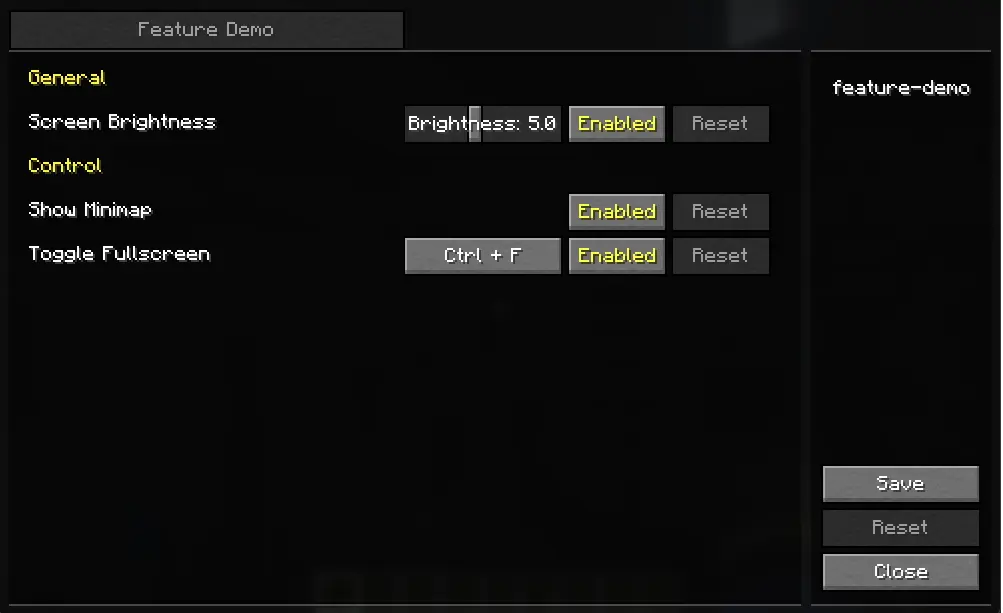
Preview Image
🔗 More Easeon Mods
Looking for more lightweight and practical mods in the same style?
Check out other Easeon series mods here.
Versions
No version history available. Use the Download button to get the latest from the source.
Comments 0
No comments yet. Be the first to share your thoughts.