
EclipseItemMailBox
ModrinthThis is an Item Mail. You can use it to send items over long distances.
ItemMailBox
A lightweight Paper 1.21.x plugin that lets players share items through an intuitive mailbox GUI - no chests, no clutter.
Features:
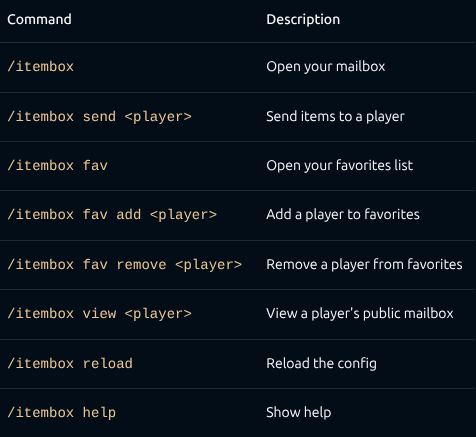
- /itembox — Open your personal inbox. Items sent by others appear here. Click to claim.
- /itembox send
— Open a send GUI. Drop in items and hit send — they arrive in the recipient's mailbox, even if they're offline. - Favorites - Add friends to your favorites list: /itembox fav add
. Open the favorites GUI (/itembox fav) and click a head to send items instantly — no more typing names. - Public mailboxes — Toggle your mailbox to public with a button in the GUI. Others can view it with /itembox view
. - Key requirement (optional) — Require a key item (configurable material) to send items. Great for server economies or gated features.
- Cooldown (optional) — Set a send cooldown in seconds to prevent spam.
- Fully configurable — All messages, titles, colors, and behavior are customizable in config.yml.
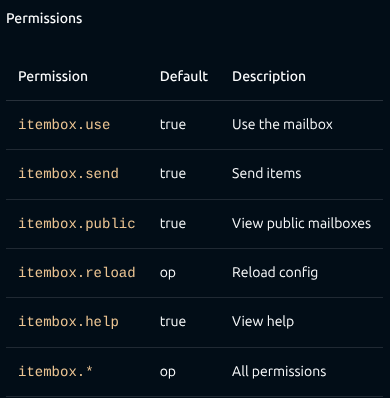
- Permissions — Granular permission nodes for every feature (itembox.use, itembox.send, itembox.reload, etc.).
Offline support — Send items and add favorites even when the target player is offline (uses the server's usercache). - GUI pagination — Browse mailboxes and favorites with next/previous page buttons.
- YAML storage — Lightweight per-player data files in the mailboxes/ folder.
Commands
Configuration
config.yml is generated on first run. Key options:
require-key: false
key-item: TRIPWIRE_HOOK
allow-public: true
send-cooldown: 0
All GUI titles and messages support & color codes.
Requirements
- Paper 1.21.x (or compatible fork)
- Java 21+
Installation
- Drop the JAR into your plugins/ folder.
- Restart the server.
- Configure config.yml to your liking.
- Done. No dependencies.
Versions
No version history available. Use the Download button to get the latest from the source.
FAQ
How do I install EclipseItemMailBox?
Download the file for your Minecraft version and loader from this page, then drop the .jar into your mods (or plugins) folder and launch the game.
Is EclipseItemMailBox free?
EclipseItemMailBox is free to download on Modgrid — we link straight to the official source, no paywall or bundled installer.
Which Minecraft versions does EclipseItemMailBox support?
Works with Paper. Supports versions 1.21–1.21.11. See the download section on this page for the full list of supported versions and loaders.
Comments 0
No comments yet. Be the first to share your thoughts.