
EclipseItemMailBox
ModrinthThis is an Item Mail. You can use it to send items over long distances.
ItemMailBox
A lightweight Paper 1.21.x plugin that lets players share items through an intuitive mailbox GUI - no chests, no clutter.
Features:
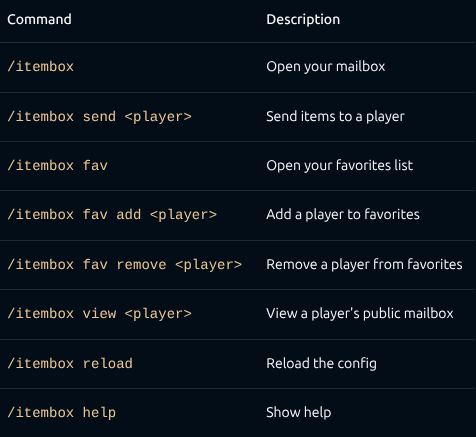
- /itembox — Open your personal inbox. Items sent by others appear here. Click to claim.
- /itembox send
— Open a send GUI. Drop in items and hit send — they arrive in the recipient's mailbox, even if they're offline. - Favorites - Add friends to your favorites list: /itembox fav add
. Open the favorites GUI (/itembox fav) and click a head to send items instantly — no more typing names. - Public mailboxes — Toggle your mailbox to public with a button in the GUI. Others can view it with /itembox view
. - Key requirement (optional) — Require a key item (configurable material) to send items. Great for server economies or gated features.
- Cooldown (optional) — Set a send cooldown in seconds to prevent spam.
- Fully configurable — All messages, titles, colors, and behavior are customizable in config.yml.
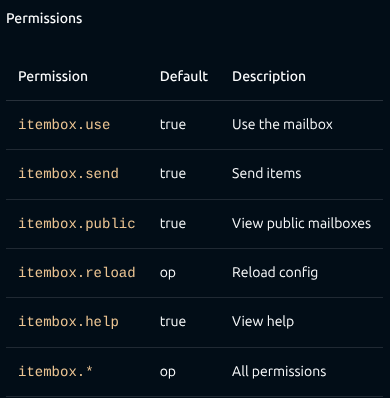
- Permissions — Granular permission nodes for every feature (itembox.use, itembox.send, itembox.reload, etc.).
Offline support — Send items and add favorites even when the target player is offline (uses the server's usercache). - GUI pagination — Browse mailboxes and favorites with next/previous page buttons.
- YAML storage — Lightweight per-player data files in the mailboxes/ folder.
Commands
Configuration
config.yml is generated on first run. Key options:
require-key: false
key-item: TRIPWIRE_HOOK
allow-public: true
send-cooldown: 0
All GUI titles and messages support & color codes.
Requirements
- Paper 1.21.x (or compatible fork)
- Java 21+
Installation
- Drop the JAR into your plugins/ folder.
- Restart the server.
- Configure config.yml to your liking.
- Done. No dependencies.
Versionen
Kein Versionsverlauf verfügbar. Nutze den Download-Button für die neueste Version von der Quelle.
FAQ
Wie installiere ich EclipseItemMailBox?
Lade die Datei für deine Minecraft-Version und deinen Loader auf dieser Seite herunter, lege die .jar in den mods- (oder plugins-) Ordner und starte das Spiel.
Ist EclipseItemMailBox kostenlos?
EclipseItemMailBox ist auf Modgrid kostenlos — wir verlinken direkt zur offiziellen Quelle, ohne Paywall.
Welche Minecraft-Versionen unterstützt EclipseItemMailBox?
Funktioniert mit Paper. Unterstützt die Versionen 1.21–1.21.11. Die unterstützten Versionen und Loader findest du im Download-Bereich dieser Seite.
Kommentare 0
Noch keine Kommentare. Sei der Erste, der seine Meinung teilt.