
Energy Shaders Java
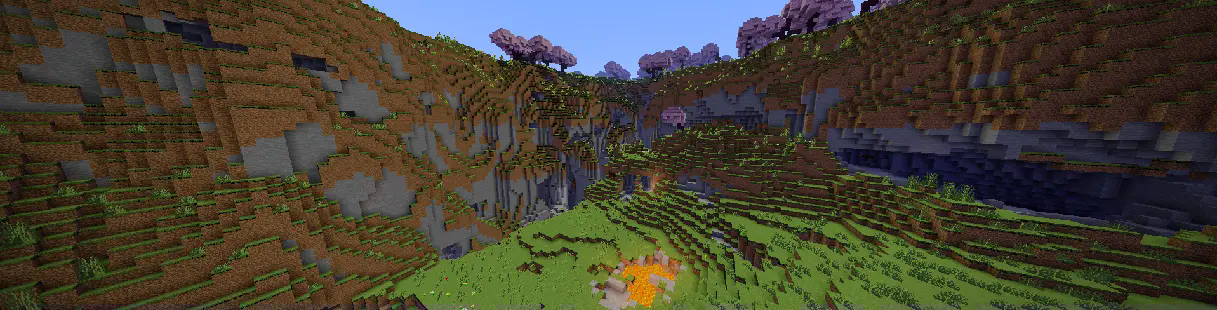
ModrinthEnergy Shaders for Java. A vanilla Minecraft shaderpack that aims on making the game more vibrant and aesthetic. Giving Minecraft a completely new Style. No Optifine/Iris required!
Energy Shaders [Java]



Energy Shaders is a shaderpack/resourcepack that provides a more colorful vanilla expierience. Without requiring
any mods or a frame rate drop.
If you like this pack consider supporting the development by buying me a coffee:

Features
It is best to take a look at the gallery or to
try the shaderpack out. Here is a list of some features:
- Custom lightning (different for day, night and in caves)
- Custom fog (different for day, night and in caves)
- Custom Nether
- Custom End
- Custom torch light (different for day, night and in caves)
- Vignette effect
Enabling the resourcepack
You can simply enable it as resourcepack (Copy the .zip into the resourcepack directory).
If you are using Sodium before minecraft 26.2, the Sodium Core Shader Support mod is required.
The pack does not work with Optifine!
Video
Customization (Since v. 2.8.0)
Energy Shaders also offers a lot of customization. Since this is a vanilla shader-pack, these settings have to be
manually edited.
Getting started with customizing energy shaders
First download the settings template.
Then copy the downloaded zip file to your resourcepacks directory. You can find it by pressing Open Pack Folder in
Minecraft's Resourcepack selection screen. Next extract the zip file and delete it, so that only the extracted
directory ES Settings Java remains. You can rename the directory to your liking.
Now edit ES Settings Java/pack.mcmeta with a text editor of your choosing and change YOUR_NAME to your name or your alias.
Next you should test if everything works. Activate Energy Shaders \[Java] and the ES Settings Java pack you just created. Make
sure the ES Settings Java pack is above Energy Shaders \[Java]. Open a world and Minecraft should not crash. Keep the
Now you can start to actually change some settings. Open ES Settings Java/assets/minecraft/shaders/include/es-settings.glsl
in your favorite text editor.
In there you will find a lot of lines starting with // #define. These are the settings, which can be changed. All Settings
must be enabled first (by removing the //) before its value can be changed. Some settings do not have a value. These simply enable or disable
a feature.
After changing a setting go back in game and press F3 + T, which will reload all resourcepacks. Thus, applying your changes.
Example 1
The line
// #define DISABLE_SHADOW
can be changed to
#define DISABLE_SHADOW
which will disable shadows cast by blocks, trees, etc.
NOTE: The // must be removed as seen above!
Example 2
The line
// #define SATURATION 1.2
can be changed to
#define SATURATION 0.0
which will make the game look grayscale.
NOTE: The // must be removed as seen above!
If you want to switch back to the default value simple add the // again:
//#define SATURATION 0.0
How do I know which setting does what?
Some settings are explained in the es-settings.glsl. Some may be hard to explain, and you just have to try around
and find out. Generally, if a setting contains a VEC3(...), it is a setting with three values (red, green, blue).
Of course, you can always ask for help in my discord server: https://discord.gg/shVe3cR
Why are the settings in a different pack and not just contained in Energy Shaders directly
Actually, the settings are contained in Energy Shaders too! But it is much more convenient if the settings are in an
additional pack, because you can update Energy Shaders without losing your settings!
Feedback
Feel free to leave any feedback on my Discord server. Please respect,
that vanilla Minecraft is very limited.
Versions
FAQ
How do I install Energy Shaders Java?
Download the file for your Minecraft version and loader from this page, then drop the .jar into your mods (or plugins) folder and launch the game.
Is Energy Shaders Java free?
Energy Shaders Java is free to download on Modgrid — we link straight to the official source, no paywall or bundled installer.
Which Minecraft versions does Energy Shaders Java support?
Works with Vanilla. Supports versions 1.20.1–26.3. See the download section on this page for the full list of supported versions and loaders.
Comments 0
No comments yet. Be the first to share your thoughts.