
FoDiscordBot
ModrinthA highly customizable discord bot plugin that adds a bunch of cool features.
FoDiscordBot connects Minecraft and Discord with account linking, configurable rewards, profile embeds, leaderboards, chat relay, booster rewards, rank role sync, and network-mode MySQL storage for multi-gamemode servers.
Features
- Link Minecraft and Discord accounts with secure in-game codes.
- Run one Discord bot across multiple gamemode servers through shared MySQL/MariaDB storage.
- Reward linked players per gamemode, with claim tracking to prevent unlink abuse.
- Show configurable Discord
/profileembeds using PlaceholderAPI values. - Show Discord
/leaderboardembeds from configurable PlaceholderAPI lines. - Relay Minecraft chat into Discord with player names, gamemode labels, and skin avatars.
- Manage common setup from the in-game config editor instead of editing every value by hand.

Discord Profiles And Chat
Use /profile in Discord to show a linked Minecraft player, online status, and any configured PlaceholderAPI-backed fields.

Minecraft chat can also be relayed to Discord with the player's in-game name and skin avatar.

Network Mode
- Share linked accounts across every gamemode.
- Keep one Minecraft account and one Discord account linked only once across the network.
- Sync profile, leaderboard, FoAdvancements, booster, and reward state through MySQL/MariaDB.
- Use one primary Discord node while secondary servers keep publishing data.
- Queue cross-server Minecraft chat relay messages through the shared database.
Commands
/discord- Shows the configured Discord invite./link- Generates a Minecraft account link code./unlink- Unlinks the player's Discord account./fodiscordbotadmin version- Checks the installed version against Modrinth./fodiscordbotadmin editor- Opens the in-game config editor./fodiscordbotadmin reload- Reloads the plugin config./fodiscordbotadmin resetrewards <linked|booster> <player|all> [gamemode]- Resets link or booster reward claims.
Aliases: /discordbotadmin, /fodiscord, and /fodiscordbot.
Discord Commands
/link <code>- Links a Discord account to a Minecraft account./unlink- Unlinks the Discord account./profile <target> <gamemode>- Shows a configurable Minecraft profile embed./leaderboard <gamemode> <board>- Shows a configured leaderboard embed./advancements <gamemode> <player>- Shows FoAdvancements progress when the hook is enabled./ip- Shows the configured server IP when enabled.
Permissions
fodiscord.use- Allows normal players to use/link,/unlink, and/discord.fodiscordbot.admin- Allows admins to use the FoDiscordBot admin command.fodiscord.admin- Legacy admin permission kept for older setups.
FoAdvancements Hook
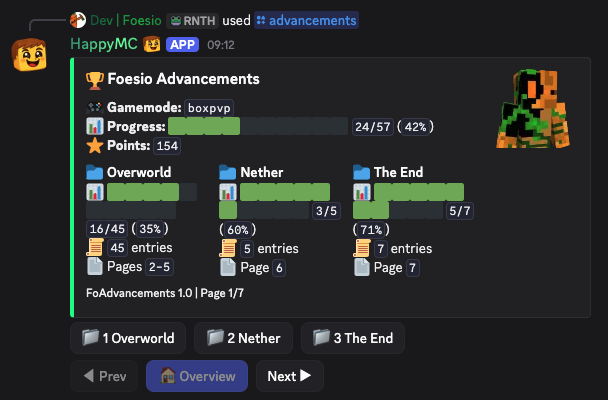
FoDiscordBot can show FoAdvancements progress directly in Discord with /advancements <gamemode> <player>. The embed includes total progress, points, tab summaries, per-tab pages, and buttons for switching between overview and advancement pages.
In network mode, gamemode servers can publish FoAdvancements snapshots to MySQL so the primary Discord node can answer lookups from shared data.
Dependencies
- PlaceholderAPI is optional, but needed for PlaceholderAPI-backed profile fields and leaderboard lines.
- FoAdvancements is optional, but needed on gamemode servers that should publish advancement progress.
- MySQL/MariaDB is required only when network mode is enabled.
Commentaires 0
Aucun commentaire pour l'instant. Sois le premier à donner ton avis.