
FP's AntiFreecam
ModrinthProtect your server from Freecam, X-Ray, and ESP. Inspired by the Donut SMP








Need a server?
Click the banner below and use code FLEOX for 30% off your first 2 billing cycles with Alyrix Cloud:

Alyrix Cloud
FPAntiFreeCam stops players from finding bases, caves and ores with FreeCam, X-Ray and Block ESP mods.
It works on the packets the server sends, so nothing in your world is changed. The client simply never gets the blocks it isn't supposed to see:
- On the surface, everything deep underground is hidden. A FreeCam user who flies down finds empty void, or with Smart Fill, plain rock that looks like normal terrain.
- Underground, players see the caves around them as normal, but caves further away stay filled in until they actually get there.
- Ores are sent as stone, deepslate or netherrack until the player has a clear line of sight to them. An X-Ray pack shows nothing but rock.
Requirements
- PacketEvents 2.x
- Spigot, Paper, Purpur or Folia, 1.19 or newer
Features
- Anti-FreeCam: hides everything below a set Y level while players are on the surface.
- Smart Fill: fills hidden areas with rock copied from the surrounding terrain instead of air, so it's hard to tell anything is hidden at all.
- Anti-Xray: ores stay hidden until you can actually see them, including from the F5 camera. Ore lists and height ranges can be set per world.
- Hides more than blocks: chests, signs, spawners, mobs, item frames, particles and sounds in hidden areas are hidden too, so the F3 pie chart and ESP mods can't find a base.
- Freecam mod detection: checks on join whether the client has the Freecam mod installed, and runs the commands you choose (kick, ban, alert staff).
- Bedrock support: works with Geyser and Floodgate.
- Folia support: every check runs on the region thread that owns the area.
- Light on the network: chunk refreshes are spread over ticks, and ore reveals are sent as small block updates, never whole chunks.
- Update checker: tells admins in game and in the console when a new version is out.
Commands
| Command | Description |
|---|---|
| /fpac reload | Reload the config |
| /fpac stats | Show live plugin stats |
| /fpac debug | Toggle debug logging |
| /fpac world <add\|remove> <world> | Add or remove a protected world |
| /fpac bypass <player> | Toggle bypass for a player until they leave |
| /fpac help | Show command help |
| /fpreload | Short for /fpac reload |
| /fpdebug | Short for /fpac debug |
All commands need fpantifreecam.admin.
Aliases: /fpafc, /antifreecam, /fpacreload, /fpacdebug
Permissions
| Permission | Description | Default |
|---|---|---|
| fpantifreecam.admin | All commands (no bypass included) | OP |
| fpantifreecam.reload | Reload the config | OP |
| fpantifreecam.debug | Toggle debug mode | OP |
| fpantifreecam.world | Manage protected worlds | OP |
| fpantifreecam.alerts | Get Freecam detection alerts in chat | OP |
| fpantifreecam.bypass | Skip both FreeCam protection and Anti-Xray | No one |
| fpantifreecam.bypass.freecam | Skip FreeCam protection only | No one |
| fpantifreecam.bypass.xray | Skip Anti-Xray only | No one |
OPs are protected like everyone else. Give a bypass permission to staff or builders who need to see everything.
bypass.freecam and bypass.xray override bypass when set, so bypass: true with bypass.xray: false keeps Anti-Xray on for that player.
Config
Click to expand config.yml
# ─────────────────────────────────────────────────────────────────────
#  FPAntiFreeCam configuration
#  Anti-FreeCam protection for Spigot, Paper and Folia (1.19 - 26.1+)
#  Apply changes with /fpac reload.
# ─────────────────────────────────────────────────────────────────────

# Do not change this manually.
config-version: 5.4

# ── General ──────────────────────────────────────────────────────────
settings:
  # Check for updates on startup and tell admins on join.
  update-checker: true

  # Language file to use, from plugins/FPAntiFreeCam/lang/<language>.yml
  language: "en"

  # Print debug info to console. Keep false on a live server.
  debug-mode: false

  # Minimum seconds between chunk refreshes for one player.
  # Stops refresh spam when someone keeps crossing protection-y.
  refresh-cooldown-seconds: 3

# ── Worlds ───────────────────────────────────────────────────────────
# Worlds where underground hiding is active.
# Avoid the Nether and End, they can cause visual glitches.
worlds:
  list:
    - "world"
    # - "survival"

# ── Protection ───────────────────────────────────────────────────────
# How the Y levels fit together (defaults):
#
#   protection-y        64   At or above this, everything below void-y is hidden.
#   deep-deactivation-y 20   Below this, protection is always off.
#   void-y              15   Blocks at or below this are what gets hidden.
#
# Between deep-deactivation-y and protection-y, protection turns on only
# when the player looks upward or has an open path up to the surface.
# Rule: void-y < deep-deactivation-y < protection-y
protection:
  # Roughly your world's surface height (64 for a normal overworld).
  protection-y: 64.0

  # How far below protection-y a player must go before protection turns
  # off again. Stops flickering when jumping around at the surface.
  hysteresis-y: 2.0

  # Blocks at or below this Y are hidden. Set it about 5 blocks above
  # the highest point of the bases you want to protect.
  void-y: 15

  # Different void-y per world. Worlds not listed use void-y above.
  # per-world-void-y:
  #   resource_world: 20

  # Players below this Y always have protection off.
  deep-deactivation-y: 20.0

  # Also hide chests, signs, spawners, mobs, items, particles and sounds
  # inside hidden areas. Stops the F3 pie chart and ESP mods from
  # finding bases. Keep this on.
  pie-chart-protection: true

  # Smart Fill reveal: how much of the real cave around a player is shown.
  # Only used when replacement.smart-fill.enabled is true.
  smart-fill:
    # Everything within this many blocks of the player is shown as real.
    reveal-radius: 28

    # Open space in the direction the player is looking is shown as real
    # up to this many blocks away.
    look-distance: 48

    # Seconds an area stays real after the player leaves it, so it doesn't
    # flicker when they move back and forth. 0 = switch back instantly.
    # Very high values make it easier to scout a base and freecam back later.
    recently-revealed-ttl-seconds: 45

    # Show caves as far as the player can actually see across them, so big
    # caverns don't show a wall of fake stone. Walls still block the view,
    # so bases behind them stay hidden.
    reveal-line-of-sight: true

    # Don't see further than the player's render distance.
    reveal-follow-render-distance: true

    # Maximum line-of-sight distance in blocks (32-256).
    reveal-max-distance-cap: 128

    # Blocks checked per player each second for line of sight.
    # Lower this if it costs too much server time.
    reveal-sight-budget: 60000

# ── What hidden blocks look like ─────────────────────────────────────
replacement:
  # Block shown instead of hidden blocks when Smart Fill is off.
  block-type: "air"

  # Smart Fill: fill hidden areas with stone, deepslate and ores copied
  # from nearby terrain, so they look like normal rock instead of a void.
  smart-fill:
    enabled: true

    # Keep hiding distant caves while players are underground, not only
    # while protection is on at the surface.
    always-on: true

    # Use plain hiding (below void-y) for Bedrock players instead of Smart
    # Fill. Smart Fill re-sends chunks as players move, which Bedrock
    # (Geyser) shows as glitchy chunk reloads. Needs Geyser or Floodgate.
    disable-for-bedrock: true

    # Top Y of the area Smart Fill hides. Defaults to protection-y.
    # ceiling-y: 64

    # How many 16-block layers above and below to copy blocks from (0-4).
    sample-radius-sections: 1

    # Max different block types used in the fill (2-16).
    max-palette-size: 6

    # Block used when there is no nearby terrain to copy from.
    fallback-block: "stone"

    # Small enclosed rooms near the surface (PvP arenas, crystal holes)
    # are left alone instead of being filled. Note: a small, low hidden
    # room near the surface would be left alone too.
    surface-structures:
      # Only rooms with their roof at or above this Y.
      min-y: 30
      # Only rooms at most this many blocks tall (1-32).
      max-pocket-height: 10

# ── Anti-Xray ────────────────────────────────────────────────────────
# Ores are sent as the rock around them until the player has a clear
# line of sight to them. Works in any world, not only those in worlds:.
# Bypass: fpantifreecam.bypass.xray (or fpantifreecam.bypass).
# If Paper's own anti-xray is on in the same world, turn one of them off.
anti-xray:
  enabled: true

  # Ores within this many blocks are always shown, without a raycast.
  always-reveal-radius: 3

  # Max distance in blocks an ore can be revealed from (also capped by view distance).
  max-ray-distance: 64

  # Ray steps per player per check. Lower if it costs too much server time.
  ray-budget: 20000

  # Also test F5 front/back camera positions.
  f5-aware: true

  # Blocks a revealed ore stays revealed after the player moves away.
  forget-distance: 96

  # Per-world settings. Worlds not listed use "default"; listed worlds
  # inherit any key they leave out from "default".
  worlds:
    default:
      enabled: true
      min-y: -64
      # 320 covers mountain ores (emerald, iron and coal generate up there).
      max-y: 320
      hidden-ores: [coal_ore, deepslate_coal_ore, copper_ore, deepslate_copper_ore,
        iron_ore, deepslate_iron_ore, gold_ore, deepslate_gold_ore, redstone_ore,
        deepslate_redstone_ore, lapis_ore, deepslate_lapis_ore, diamond_ore,
        deepslate_diamond_ore, emerald_ore, deepslate_emerald_ore, raw_iron_block, raw_copper_block]
    world_nether:
      hidden-ores: [nether_gold_ore, nether_quartz_ore, ancient_debris, gilded_blackstone]
      max-y: 128
    world_the_end:
      enabled: false

# ── Entities ─────────────────────────────────────────────────────────
entities:
  # Hide mobs, item frames, minecarts etc. inside hidden areas
  # (mob farms, storage mobs) from protected players.
  hide-entities: true

# ── Notifications ────────────────────────────────────────────────────
notifications:
  action-bar:
    # Show an action bar message while a player is protected.
    enabled: false
    message-active: "&c☠ FreeCam Protected"

# ── Anti-cheat ───────────────────────────────────────────────────────
anti-cheat:
  freeze-detection:
    # Warn in console when a protected player hasn't moved for this
    # many seconds (can mean a position-spoofing freecam).
    enabled: false
    seconds: 30

# ── Performance ──────────────────────────────────────────────────────
performance:
  # Paper/Spigot: max chunks refreshed per tick (1-500).
  max-chunks-per-tick: 40

  # Folia: max chunks re-sent to one player per tick (1-64). Smart Fill
  # refreshes are spread out over ticks so they don't flood the network.
  max-chunks-per-player-per-tick: 8

  # When a player comes near protection-y, refresh a large radius at once
  # so there is no moment where real blocks show.
  instant-protection:
    enabled: true
    force-immediate-refresh: true
    # Chunk radius to refresh.
    instant-load-radius: 14
    # How many blocks above protection-y this starts.
    pre-load-distance: 10

  # Only refresh chunks within this radius when protection changes.
  # Chunks further out can briefly show real blocks until they reload.
  # Leave off unless you need the performance.
  limited-area:
    enabled: false
    chunk-radius: 4

# ── Freecam mod detection ────────────────────────────────────────────
# On join, a hidden anvil opens for a split second to check if the
# player's client has the Freecam mod installed. Only runs once per join.
# Test it with a real Freecam client before using a ban command.
freecam-detection:
  enabled: true

  # Ticks the hidden anvil stays open (20 ticks = 1 second).
  probe-timeout-ticks: 5

  # Print debug info about each check to console.
  debug: false

  # Console commands run when a player is detected, in order.
  # Placeholders: %player%, %uuid%, %key%
  detected-commands:
    - "kick %player% &cFreecam detected"
    # - "ban %player% Freecam detected"

  # Alert staff with the fpantifreecam.alerts permission and the console.
  alerts-enabled: true
  alert-message: "&8[&cFPAntiFreecam&8] &e%player% &7was flagged for &cFreecam &7(&8%key%&7)"
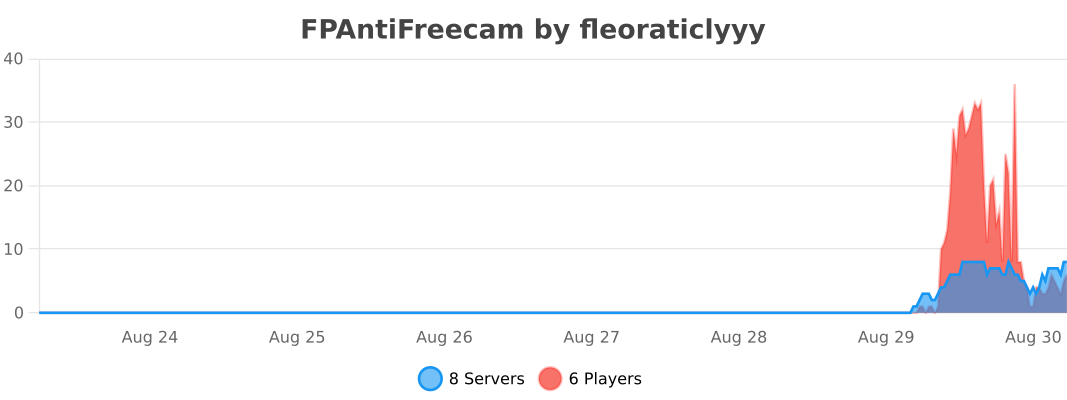
Statistics
Support
Found a bug or have a question? Ask on Discord or open an issue on GitHub.


Secure what players shouldn't see.
Версии
FAQ
Как установить FP's AntiFreecam?
Скачайте файл под свою версию Minecraft и загрузчик с этой страницы, затем положите .jar в папку mods (или plugins) и запустите игру.
FP's AntiFreecam бесплатный?
FP's AntiFreecam можно скачать бесплатно на Modgrid — мы ведём прямо к официальному источнику, без paywall и лишних установщиков.
Какие версии Minecraft поддерживает FP's AntiFreecam?
Работает с Bukkit, Folia, Paper, Purpur. Поддерживаются версии 1.19–26.3. Список поддерживаемых версий и загрузчиков — в блоке загрузки на этой странице.
Комментарии 0
Пока нет комментариев. Будь первым, кто поделится мнением.