
HUD bars
ModrinthThis mod replaces hud icons with bars
2.2k загрузок 9 подписчиков обновлено 5mo ago
последняя v1.1.6 Modrinth
This mod replaces the
- health bar
- hunger bar
- armor bar
- xp bar
with actual bars with numbers
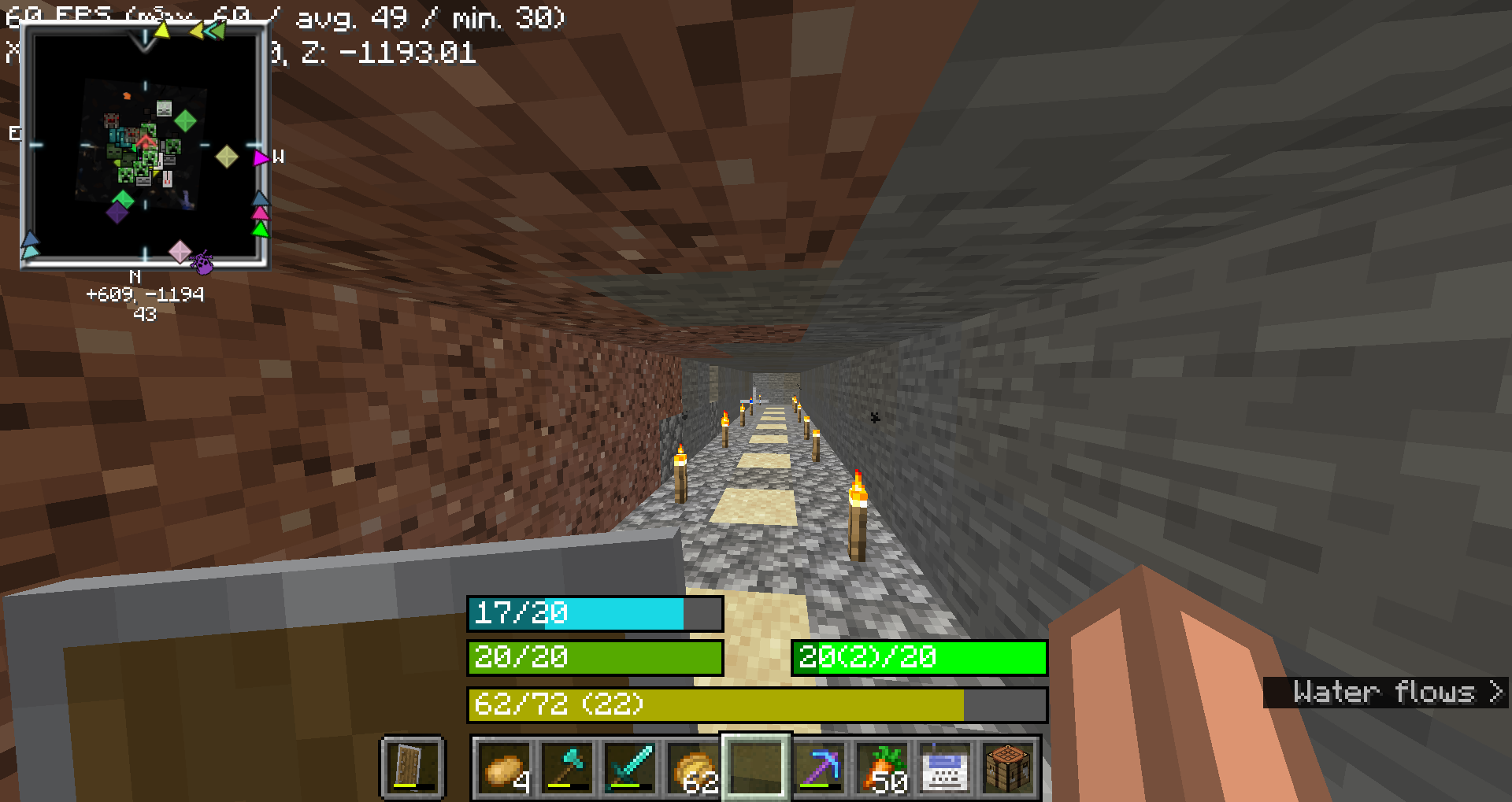
Health Bar
- Format: Displays as
"current/maximum", wherecurrentis the player's current health (including absorption), andmaximumis the total health capacity.- Example:
20/20
- Example:
- Color:
- Normal:
#55AA00(green) - With Absorption:
#AAAA00(yellow) - Poison Effect:
#004400(dark green) - Wither Effect:
#000000(black) - Frozen State:
#00FFFF(cyan)
- Normal:
- Border Color:
- Blinking and Health Changed:
#FFFFFF(white) - Blinking without Health Change:
#FF0000(red) - Health Changed without Blinking:
#FF80FF(light purple) - No Change:
#000000(black)
- Blinking and Health Changed:
Food Bar
- Format: Displays as
"current(saturation)/maximum", wherecurrentis the player's current food level andsaturationis the saturation level.- Example:
15(5)/20
- Example:
- Color:
- Hunger Effect:
#AA55AA(purple) - Saturation Effect:
#00FF00(green) - Full (20 food levels):
#00FF00(green) - High (18-19 food levels):
#33FF00(bright green) - Moderate (7-17 food levels):
#66FF00(lime green) - Low (1-6 food levels):
#FFFF00(yellow) - Empty:
#FF0000(red)
- Hunger Effect:
- Saturation Overlay:
- Color: A darker shade of the food bar color, indicating the saturation level within the food bar.
- Example: If the food bar is
#00FF00(green) and saturation is high, the overlay might be#007F00(darker green).
Armor Bar
- Format: Displays as
"current/maximum", wherecurrentis the player's current armor level.- Example:
10/20
- Example:
- Color:
- Transitions from
#AAto#FFin red-green-blue channels as armor level increases, creating a gradient from grey to green:- Low Armor: More red, less green
- High Armor: More green, less red
- Example: At low armor, you might see
#AA5555(greyish-red) and at high armor, you might see#55FF55(green).
- Transitions from
- Toughness Overlay:
- Color: A darker shade of the armor bar color, indicating the armor toughness level within the armor bar.
- Example: If the armor bar is
#55FF55(green) and toughness is high, the overlay might be#2A7F2A(darker green).
Experience Bar
- Format: Displays as
"current/required (level)", wherecurrentis the amount of experience gained towards the next level,requiredis the total experience needed for the next level, andlevelis the current experience level.- Example:
150/300 (10)
- Example:
- Color:
- Experience Bar:
#AAAA00(yellow)
- Experience Bar:
Комментарии 0
Пока нет комментариев. Будь первым, кто поделится мнением.