JavAlert
ModrinthSend native OS alerts and notifications to players! Perfect for trolling friends, server announcements, quest systems, and automated interactions. Alerts appear outside the game as real system notifications on Windows, macOS, and Linux.
JavAlert
Send native OS alerts and notifications to players! Perfect for trolling friends, server announcements, quest systems, and automated interactions. Alerts appear outside the game as real system notifications on Windows, macOS, and Linux.
Full documentation: Wiki
Features
- Native System Notifications - Real OS notifications outside the game
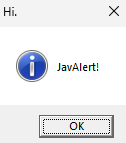
- Message Boxes - Native dialog boxes (Windows, macOS, Linux)
- Custom In-Game Screens - Beautiful custom alert screens with buttons
- Alert Beacon Block - Automatically trigger alerts when players enter detection radius
- Conditional Triggers - Trigger based on inventory, stats, location, biome, and more
- Templates - Save and reuse alert configurations
- Multi-Language Support - English, Spanish, French, German
- API Integration - Comprehensive API for mod developers
Quick Start
- Place an Alert Beacon block in your world
- Right-click to configure radius, message, and display type
- Set trigger mode (ENTER, EXIT, STAY, PROXIMITY, PORTAL)
- Add conditions and filters (optional)
- Save and players will receive alerts automatically!
Commands
/alert <target> simple <message>- Simple alert/alert <target> messagebox <title> <message>- Messagebox alert/alert <target> notification <message>- Notification alert/alert <target> customscreen <title> <primaryButton> [secondaryButton] <message>- Custom screen/alert manage- Management GUI (OP Level 5)/alert documentation- In-game documentation
API for Mod Developers
See API Documentation.
Installation
- Download
JavAlert-1.2.jarfrom Modrinth - Place in your
modsfolder - Restart Minecraft
Configuration
Access configuration via the "JavAlert Config" button on the main menu (icon next to Singleplayer button).
Documentation
Complete documentation: Wiki
- Getting Started
- Alert Beacon Guide
- Conditions and Filters
- Templates
- Commands
- API Documentation
- Troubleshooting
You can also use /alert documentation in-game for interactive documentation.
Technical Details
- Minecraft: 1.20.1
- Forge: 47.4.13+
- Java: 17+
- License: All Rights Reserved
Developer note :
This is my first Minecraft mod, so i am just testing things with this mod and other mods are coming soon !
Comments 0
No comments yet. Be the first to share your thoughts.