Language

Just Enough Items (JEI)

Just Enough Items (JEI)

ModrinthCurseForge

View Items and Recipes

76.7M downloads 11.0k followers updated 4h ago
latest v19.56.0.441 Modrinth
Fabric Forge Neoforge 1.8 – 26.3 LibraryUtility

Just Enough Items

JEI is an item and recipe viewing mod for Minecraft, built from the ground up for stability and performance.
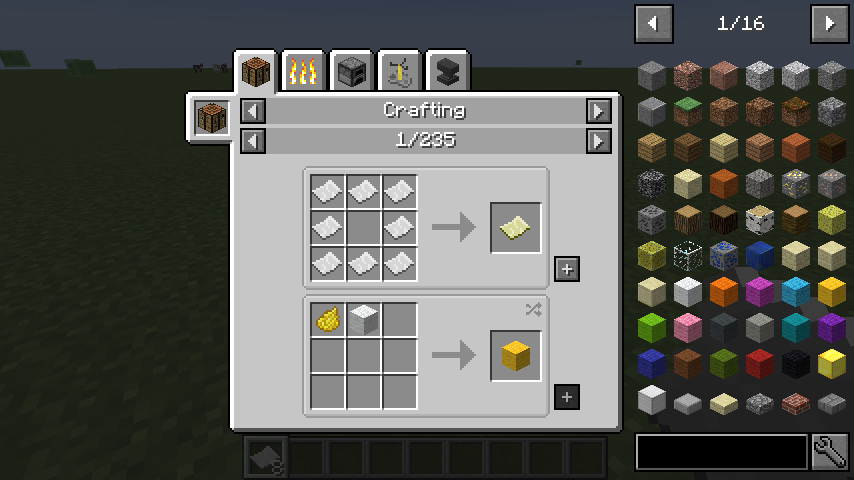
JEI Recipe GUI

Controls

Inventory:

(Minecraft Options -> Controls)

Show Recipes: Hover over item + R
Show Uses: Hover over item + U
Toggle Item List Overlay: Control + O

Item List:

Show Recipes: Click Item or type R
Show Uses: Right-Click Item or type U
Next/Previous page: Scroll Wheel

Select Search Bar: Click or Control + F
Clear Search: Right Click
Previous Search: *Up Arrow *
Search by Mod Name: Type @ in front of a word (@thaum)
Multiple terms work together (wand @thaum)

Exclude search terms: Type - in front of a word (@thaum -wand)

Search terms that have spaces in them: Type "" around the words ("two words")

Recipe View:

Next/Previous page: Scroll Wheel
Show all Recipes: Click the recipe category's name
Move items into crafting area: Click the [+] button. Shift-Click to move multiple sets of items.

View advanced controls

Search by Tooltip Only: Type # in front of a word
Search by OreDict name: Type $ in front of a word
Search by Creative Tab: Type % in front of a word
Multiple Searches: Separate terms with | characters, like "wrench|hammer"

With Cheat Mode Active:

Get a full stack of Items: Click Item
Get one Item: Right-Click Item
Delete Item: Drop an Item into the Item List

With Item List Edit Mode Active:

(These controls are shown in-game on the item tooltip)

Hide Item: Control-Click Item
Hide Items and Sub-Items: Control-Right-Click Item
Hide all Items from a mod: Control-Shift-Click Item

FAQ

Can I include JEI in my mod pack?

Of course!

Can JEI run client-only, or with a vanilla server?

[1.21.1 or lower] Yes, with some features disabled:

  • The "Move items into crafting area" [+] buttons.
  • Cheating in items that have lots of NBT data.
  • Deleting items.

[1.21.2+] Since Minecraft 1.21.2, recipes are stored on the server and not the client. Please install JEI and NeoForge/Fabric on the server to sync recipes to the client.

Where can I find the ___ feature from NEI?

The chart here shows which mods support each feature.

I have an issue / bug / crash / report / request, where can I send it?

JEI Github Issues Page

Support

Become a patron on Patreon

Versions

Beta
19.56.0.441
neoforge · 1.21, 1.21.1 · 4h ago
* [Add damage bar ingredients to debug plugin](https://github.com/mezz/JustEnoughItems/commit/3309966b4623ce69b659329cdfb3e0b3d127af0e) - mezz * [Fix #4479…
3.3k
Beta
19.56.0.441
forge · 1.21, 1.21.1 · 4h ago
* [Add damage bar ingredients to debug plugin](https://github.com/mezz/JustEnoughItems/commit/3309966b4623ce69b659329cdfb3e0b3d127af0e) - mezz * [Fix #4479…
98
Beta
19.56.0.441
fabric · 1.21, 1.21.1 · 4h ago
* [Add damage bar ingredients to debug plugin](https://github.com/mezz/JustEnoughItems/commit/3309966b4623ce69b659329cdfb3e0b3d127af0e) - mezz * [Fix #4479…
896
Beta
31.0.0.5
neoforge · 26.3 · 4h ago
* [Publish after release pipeline changes](https://github.com/mezz/JustEnoughItems/commit/5cdfe5e38b65c18a33bd05776e01d59ea38e01ac) - mezz
292
Beta
31.0.0.5
fabric · 26.3 · 4h ago
* [Publish after release pipeline changes](https://github.com/mezz/JustEnoughItems/commit/5cdfe5e38b65c18a33bd05776e01d59ea38e01ac) - mezz
3.6k
Beta
15.59.0.212
forge · 1.20.1 · 5h ago
* [Add damage bar ingredients to the debug plugin](https://github.com/mezz/JustEnoughItems/commit/f80535691f06bdf1ab886f7bc1eb3e5b47c396f5) - mezz * [Fix…
4.1k
Beta
15.59.0.212
fabric · 1.20.1 · 5h ago
* [Add damage bar ingredients to the debug plugin](https://github.com/mezz/JustEnoughItems/commit/f80535691f06bdf1ab886f7bc1eb3e5b47c396f5) - mezz * [Fix…
735
Beta
31.0.0.3
fabric · 26.3 · 5h ago
* [Publish initial Jenkins builds](https://github.com/mezz/JustEnoughItems/commit/c02a280e67c345146976d1b6ac885203fc4d6709) - mezz
877
Beta
19.56.0.440
neoforge · 1.21, 1.21.1 · 1d ago
* [Fix #4491 Fix crash from client config registration during datagen](https://github.com/mezz/JustEnoughItems/commit/bf7b64d24f18b957ffdb806227b6077a2088eaff)…
13.3k
Beta
19.56.0.440
forge · 1.21, 1.21.1 · 1d ago
* [Fix #4491 Fix crash from client config registration during datagen](https://github.com/mezz/JustEnoughItems/commit/bf7b64d24f18b957ffdb806227b6077a2088eaff)…
407
Beta
19.56.0.440
fabric · 1.21, 1.21.1 · 1d ago
* [Fix #4491 Fix crash from client config registration during datagen](https://github.com/mezz/JustEnoughItems/commit/bf7b64d24f18b957ffdb806227b6077a2088eaff)…
4.1k
Beta
29.37.0.99
neoforge · 26.1, 26.1.1, 26.1.2 · 1d ago
* [Fix #4489 hidden focus-linked recipes](https://github.com/mezz/JustEnoughItems/commit/ef9f5dc9a05af76dfc64ce8baae22321fb1dcfc5) - mezz * [Use Minecraft's…
739

Comments 0

No comments yet. Be the first to share your thoughts.

FAQ

How do I install Just Enough Items (JEI)?

Download the file for your Minecraft version and loader from this page, then drop the .jar into your mods (or plugins) folder and launch the game.

Is Just Enough Items (JEI) free?

Just Enough Items (JEI) is free to download on Modgrid — we link straight to the official source, no paywall or bundled installer.

Which Minecraft versions does Just Enough Items (JEI) support?

Works with Fabric, Forge, Neoforge. Supports versions 1.8–26.3. See the download section on this page for the full list of supported versions and loaders.

Download Just Enough Items (JEI)

CurseForge
B 19.56.0.441 1.21, 1.21.1 neoforge 2.1 MB B 19.56.0.441 1.21, 1.21.1 forge 2.1 MB B 19.56.0.441 1.21, 1.21.1 fabric 2.1 MB B 31.0.0.5 26.3 neoforge 1.8 MB B 31.0.0.5 26.3 fabric 1.8 MB B 15.59.0.212 1.20.1 forge 1.7 MB B 15.59.0.212 1.20.1 fabric 1.8 MB B 31.0.0.3 26.3 fabric 1.8 MB B 19.56.0.440 1.21, 1.21.1 neoforge 2.1 MB B 19.56.0.440 1.21, 1.21.1 forge 2.1 MB B 19.56.0.440 1.21, 1.21.1 fabric 2.1 MB B 29.37.0.99 26.1, 26.1.1, 26.1.2 neoforge 1.8 MB B 29.37.0.99 26.1, 26.1.1, 26.1.2 fabric 1.8 MB B 30.32.0.221 26.2 neoforge 1.8 MB B 30.32.0.221 26.2 fabric 1.8 MB B 30.32.0.220 26.2 neoforge 1.8 MB B 30.32.0.220 26.2 fabric 1.8 MB B 30.32.0.219 26.2 neoforge 1.8 MB B 30.32.0.219 26.2 fabric 1.8 MB B 30.32.0.218 26.2 neoforge 1.8 MB B 30.32.0.218 26.2 fabric 1.8 MB B 15.59.0.211 1.20.1 forge 1.7 MB B 15.59.0.211 1.20.1 fabric 1.8 MB B 19.56.0.439 1.21, 1.21.1 neoforge 2.1 MB B 19.56.0.439 1.21, 1.21.1 forge 2.0 MB B 19.56.0.439 1.21, 1.21.1 fabric 2.1 MB B 30.32.0.217 26.2 neoforge 1.8 MB B 30.32.0.217 26.2 fabric 1.8 MB B 30.32.0.216 26.2 neoforge 1.8 MB B 30.32.0.216 26.2 fabric 1.8 MB B 19.56.0.438 1.21, 1.21.1 neoforge 2.1 MB B 19.56.0.438 1.21, 1.21.1 forge 2.0 MB B 19.56.0.438 1.21, 1.21.1 fabric 2.1 MB B 19.56.0.435 1.21, 1.21.1 neoforge 2.0 MB B 19.56.0.435 1.21, 1.21.1 forge 2.0 MB B 19.56.0.435 1.21, 1.21.1 fabric 2.1 MB B 19.56.0.433 1.21, 1.21.1 forge 2.0 MB B 19.56.0.433 1.21, 1.21.1 fabric 2.1 MB B 19.55.0.432 1.21, 1.21.1 neoforge 2.1 MB B 19.55.0.432 1.21, 1.21.1 forge 2.0 MB B 19.55.0.432 1.21, 1.21.1 fabric 2.1 MB B 19.55.0.431 1.21, 1.21.1 neoforge 2.0 MB B 19.55.0.431 1.21, 1.21.1 forge 2.0 MB B 19.55.0.431 1.21, 1.21.1 fabric 2.1 MB B 30.32.0.215 26.2 neoforge 1.8 MB B 30.32.0.215 26.2 fabric 1.8 MB B 19.54.0.429 1.21, 1.21.1 neoforge 1.8 MB B 19.54.0.429 1.21, 1.21.1 forge 1.8 MB B 19.54.0.429 1.21, 1.21.1 fabric 1.8 MB B 30.32.0.214 26.2 neoforge 1.8 MB

Files are served directly from the original source. Modgrid does not host or modify them.