
LsKillGui
ModrinthSpigotMCSimple GUI-based kill confirmation plugin for survival servers
LsKillGui
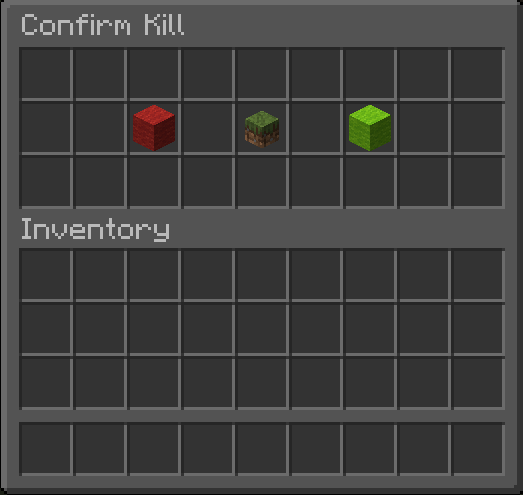
A lightweight and fully configurable confirmation GUI for /kill on Minecraft servers.
LsKillGui prevents accidental deaths by showing a confirmation menu when players use /kill. Server owners can fully customize the menu items, names, lore, and behavior through the configuration.
The plugin is designed to be simple, lightweight, and modern Paper-compatible.
Features
- Confirmation GUI when using
/kill - Optional GUI for
/kill <player> - Fully configurable GUI items
- Support for player heads in the GUI
- Supports hex colors (
&#ffffff) and normal color codes (&) - Placeholder support for
%player%and%target% - Tab completion for commands
- Lightweight and dependency-free
- Clean and simple configuration
Commands
/kill
Opens the confirmation GUI to kill yourself.
/kill <player>
Kills another player (requires permission).
/killgui reload
Reloads the plugin configuration.
Permissions
| Permission | Description | Default |
| ---------------- | ------------------------ | ------- |
| killgui.use | Allows use of /kill | OP |
| killgui.other | Allows /kill <player> | OP |
| killgui.reload | Allows /killgui reload | OP |
Configuration
The GUI is fully customizable through config.yml.
Example:
# =========================================================
# LsKillGui - config-guide.yml
# =========================================================
#
# This file explains every option in the normal config.yml.
#
# ITEM NAMES:
# Use valid Bukkit / Paper Material names such as:
# LIME_WOOL
# RED_WOOL
# PAPER
#
# Full material list:
# https://jd.papermc.io/paper/1.21.11/org/bukkit/Material.html
#
# SPECIAL CUSTOM ITEM VALUES SUPPORTED BY THIS PLUGIN:
# SELF_HEAD -> shows the head of the player opening the menu
# TARGET_HEAD -> shows the head of the target player in /kill <player>
#
# PLACEHOLDERS:
# %player% -> the player opening the GUI
# %target% -> the target player in /kill <player>
#
# OTHER NOTES:
# - Names and lore support normal color codes with & and also Hex codes like: 7ff55Hello
# - Lore can have as many lines as you want
# =========================================================
# If enabled, a confirmation GUI opens for /kill <player>.
# If disabled, /kill <player> instantly kills the target player.
other-gui: true
menus:
self:
items:
cancel:
# The item shown on the left side.
# Valid examples: RED_WOOL, BARRIER, GRAY_STAINED_GLASS_PANE
item: RED_WOOL
# Display name of the item.
name: "&c&lCancel"
# Lore lines under the item name.
lore:
- "&7Close this menu."
info:
# Special value:
# SELF_HEAD = head of the player opening the menu
# You can also replace this with a normal item like PAPER
item: SELF_HEAD
name: "&e&lConfirm Suicide"
lore:
- "&7You are about to kill yourself."
- "&7Click &aYes &7to continue."
- "&7Click &cCancel &7to go back."
confirm:
item: LIME_WOOL
name: "&a&lYes"
lore:
- "&7Kill yourself instantly."
# This menu is only used when:
# other-gui: true
other:
items:
cancel:
item: RED_WOOL
name: "&c&lCancel"
lore:
- "&7Close this menu."
info:
# Special value:
# TARGET_HEAD = head of the target from /kill <player>
# You can also replace this with a normal item like PAPER
item: TARGET_HEAD
name: "&6&lKill %target%"
lore:
- "&7You are about to kill &f%target%&7."
- "&7Click &aYes &7to confirm."
- "&7Click &cCancel &7to go back."
confirm:
item: LIME_WOOL
name: "&a&lYes"
lore:
- "&7Instantly kill &f%target%&7."
Special Item Types
The plugin supports special item placeholders:
| Item value | Result |
| ------------- | --------------------------------------------- |
| SELF_HEAD | Shows the head of the player opening the menu |
| TARGET_HEAD | Shows the head of the target player |
Placeholders
| Placeholder | Description |
| ----------- | --------------------------------- |
| %player% | Player opening the GUI |
| %target% | Target player in /kill <player> |
Compatibility
- Paper
- Spigot
- Purpur
- Minecraft 1.21+
Installation
- Download the plugin
.jar - Place it in your server's
pluginsfolder - Restart the server
- Configure
config.ymlif desired
Support
If you encounter issues or have suggestions, feel free to open an issue or contact the developer.
Versions
No version history available. Use the Download button to get the latest from the source.
Comments 0
No comments yet. Be the first to share your thoughts.