
Nearby Crafting
ModrinthAllows crafting to access nearby chests or other containers, because that's how it should be!
Nearby crafting is a simple mod for Fabric which enables crafting from nearby container blocks, such as barrels and chests.
A massive timesaver, and absolute essential for your survival world or server modpacks.
Features
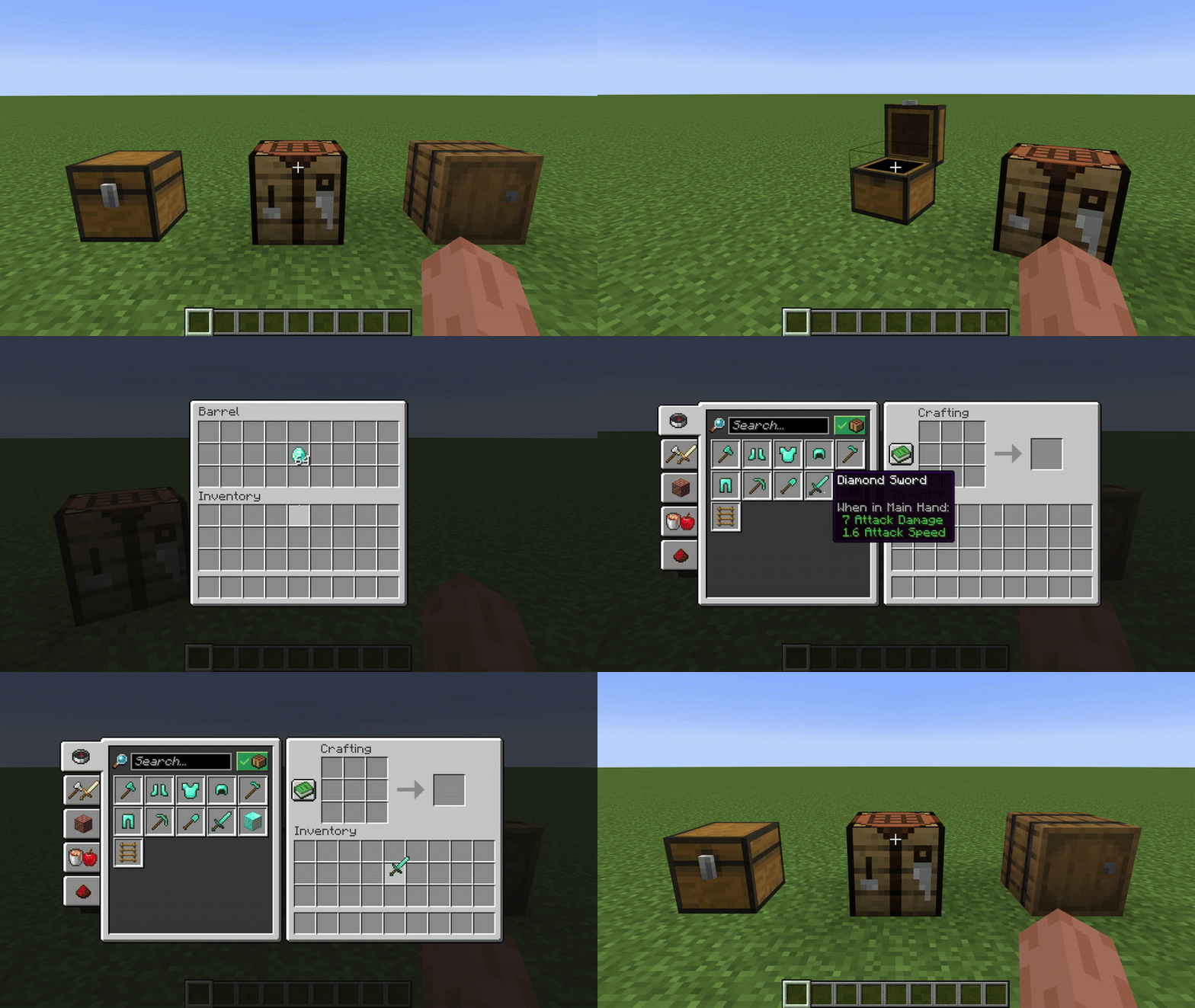
Crafting from nearby containers
This works for both crafting tables, and crafting within the player's inventory
Completley Customisable
Nearby crafting supports customising the reach radius, or toggling the reach functionality altogether.
This can be done seperatley for different crafting scenarios (i.e. Crafting Tables and Player Inventory Crafting)
By default, the reach functionality is enabled and the radius is 8 blocks for all crafting scenarios.
These can be changed using modmenu, or commands.
If you are playing on a server, you must use commands to change the config, the modmenu config page will only affect the clients settings for singleplayer.
FAQs
-
Q: I think I found an issue...
A: Feel free to create an issue on Github or reach out directly on discord @joonty -
Q: Will you release support for x ?
A: I plan to release support for older versions soon, I don't currently plan to release support outside of Fabric. If you would like to make a verion for another loader (Forge, NeoForge, etc) feel free to reach out on discord! @joonty
Commands Guide
Use the /nearbycrafting command to customize server-wide behavior for Nearby Crafting. You must be a server operator to change the server's Nearby Crafting configuration.
The command follows a simple, modular format:
/nearbycrafting <target> <action> [value]
Command Structure
<target>
This defines which crafting scenario you're configuring:
craftingtable– Affects vanilla crafting tables.playerinventorycrafting– Affects the player's inventory crafting (2x2 crafting grid).
<action>
Defines the type of action you want to perform:
enable– Turns the functionality ON.disable– Turns the functionality OFF.setReach <number>– Sets the radius (in blocks) from which inventories are accessible.getReach– Displays the current reach radius.
Examples
Enable crafting table inventory access:
/nearbycrafting craftingtable enable
Disable player inventory crafting access:
/nearbycrafting playerinventorycrafting disable
Set reach radius to 10 blocks for crafting tables:
/nearbycrafting craftingtable setReach 10
Check current reach radius for player inventory crafting:
/nearbycrafting playerinventorycrafting getReach
Note: These commands require operator permissions on the server.
Comments 0
No comments yet. Be the first to share your thoughts.