Party Inviter (mcpvp.club)
ModrinthA customisable party inviter for mcpvp.club (and other servers :))
MCPVP Party Inviter
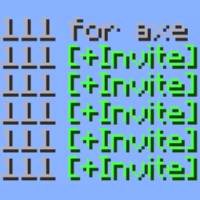
Host a party by typing a number — everyone who replies with it becomes one click to invite.
Type 222 for axe, and the next players who type 222 in chat get a clickable [+Invite] on their message. Click it (or let it auto-invite) and they're in. No more squinting at chat and re-typing names.
How it works
- You host — send a message with a number and
for(e.g.222 for axe). - Joiners light up — anyone who then types
222gets their message highlighted with a clickable [+Invite]. - One click invites them — runs your invite command (
/p invite {player}by default). - Someone else claims it? If another player posts the same number with
for, your party hands off and your invites stop.
Features
- One-click invites — joiner messages become clickable; the whole line or a tidy
[+Invite]button. - Auto-invite mode — skip the click entirely. The first joiner is invited instantly, the rest are queued and released one per interval (default 700 ms) so you don't get muted for spam.
- Hand-off detection — if another host claims your number, your invites switch off automatically.
- Smart auto-stop — the party ends when you enter a match or switch sub-servers.
- Anti-spam aware — if the server blocks your host message ("sending too quickly", "too similar"), the party simply never starts.
- Fully configurable — color, underline, invite command, keywords, sounds, and more.
Config
Open it from Mod Menu → MCPVP Party Inviter, or with /pinv config. Every option is also settable via command and saved to config/partyinviter.json.
| Setting | Default | What it does |
|---|---|---|
| inviteCommand | /p invite {player} | Command run on invite ({player} = name) |
| autoInvite | false | Invite automatically, no click |
| autoInviteCooldownMs | 700 | Spacing between queued invites |
| requireForToHost | true | Only host when your message has for |
| stopPartyOnServerChange | true | End the party when you enter a match |
| cancelPartyOnDeniedMessage | true | Don't start if the server blocks your message |
Commands
| Command | Description |
|---|---|
| /pinv status | Show current party and settings |
| /pinv host <number> | Start hosting a number manually |
| /pinv clear | Stop hosting |
| /pinv set <key> <value> | Change a setting |
| /pinv config | Open the config GUI |
| /pinv test <text> | Preview how a chat line is parsed |
Коментарі 0
Поки немає коментарів. Будь першим, хто поділиться думкою.