rrtt217's HDR Mod
ModrinthEnables native HDR in Minecraft with Iris shaders.
Minecraft HDR Mod
A minecraft mod that enables native HDR on Windows / macOS / Linux with Iris shaders.
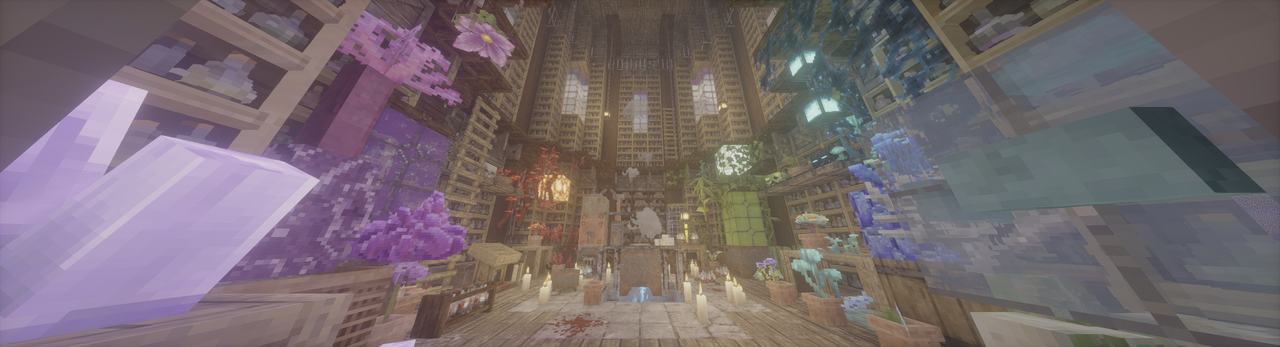
(Photon patched to HDR w/ Patrix, taken by mod's screenshot feature.)
What the mod have achieved
- Native HDR, both for scRGB and HDR10/PQ.
- UI color correction by a new render pass.
- Ingame config using Cloth Config API.
- Ingame HDR screenshot.
- Replay Mod HDR Video Export (need custom FFmpeg commandline, which can be found in config menu)
- Full Wayland IME fix (need IMBlocker).
For Users
[!IMPORTANT]
Requires modded shaderpacks! https://github.com/rrtt217/Minecraft-HDR-Mod/wiki/HDR-Shaderpacks
- Adjust HDR Brightness values (Paper White, UI, Peak) with config menu. (Default keybind: F9)
- Take a HDR screenshot ingame. (Default keybind: F10)
- Supported platforms:
- Windows: Nvidia/AMD GPU generally run flawlessly. Intel GPU is supported since v2.1.0 with a DXGI fallback path and there's performance degradation (more info in v2.1.0 release note).
- Linux Wayland: AMD/Intel GPU generally run flawlessly. People using Nvidia GPU may encounter some problems/crashes, see the troubleshooting for a potential workaround.
- macOS: Supported but need more testing, bugs are expected. Also, shaderpack support on macOS is limited.
- Android/iOS: Not supported. If Mobile launcher developers are interested in the project, my glfw fork can be a starting point for HDR support in the future.
- Troubleshooting:
- ReShade is currently not compatible under default settings, failing to load and breaking sky.
- Enabling "Force Activate OpenGL-DirectX Interop" in config/advanced can improve compatibility with SpecialK and ReShade. Please make sure they only inject into DirectX 11 layer.
- Mods also messing with GLFW may be incompatible. (e.g. Ixeris)
- If your game is too bright/dark, try to adjust the custom brightness values yourself.
- If you're on Windows, don't forget to install the latest Visual C++ Redistributable.
- If your game crashes on NeoForge/Forge, disable
earlyWindowControlin<game folder>/config/fml.toml - If HDR is broken when shaders are enabled, please reset "Colorspace" setting in Iris/Oculus to "sRGB".
- Clean temp file if your game doesn't start or some features are broken (path can be found in log, %TEMP%/glfw on Windows and /tmp/glfw on Linux).
- For Linux Nvidia users, if your game can't start, or you feel too much banding ingame, here's a potential workaround (using Zink, so performance degradation is expected):
- Use these environment variables:
export __GLX_VENDOR_LIBRARY_NAME=mesa export __EGL_VENDOR_LIBRARY_FILENAMES=/run/opengl-driver/share/glvnd/egl_vendor.d/50_mesa.json export MESA_LOADER_DRIVER_OVERRIDE=zink export GALLIUM_DRIVER=zink - ONLY WORKS ON Mesa >= 26.0.0. Lower versions crash your game due to the lack of This PR.
- Use these environment variables:
- ReShade is currently not compatible under default settings, failing to load and breaking sky.
For Shader Packs
Wiki Tutorial
Macros
HDR_MOD_INSTALLEDHDR_ENABLED
Uniforms
float HdrGameMinimumBrightness;float HdrGamePeakBrightness;float HdrGamePaperWhiteBrightness;float HdrUIBrightness;
Use these uniforms inside #if HDR_MOD_INSTALLED block.
Output
the output of the shader(aka. what is written to main render target in final pass) should have scRGB-nl encoding(Rec.709 primaries, sRGB (for negative numbers use −f(−x)) transfer function), and you should not use RGBA8F for scene color.
Credits
- Tom94, for glfw fork with color management;
- IMS212, for Iris shaders and original glfw patch idea;
- XgarhontX and some other fellows, for working on RenoDX Minecraft HDR and shader patches, and helping me to make color transform correct.
Copyright
The main HDR Mod repo is licensed under MIT. Bundled GLFW from Tom94's/mine fork is licensed under the zlib/libpng license.
Star History
Versions
FAQ
How do I install rrtt217's HDR Mod?
Download the file for your Minecraft version and loader from this page, then drop the .jar into your mods (or plugins) folder and launch the game.
Is rrtt217's HDR Mod free?
rrtt217's HDR Mod is free to download on Modgrid — we link straight to the official source, no paywall or bundled installer.
Which Minecraft versions does rrtt217's HDR Mod support?
Works with Fabric, Forge, Neoforge. Supports versions 1.20–26.3. See the download section on this page for the full list of supported versions and loaders.
Comments 0
No comments yet. Be the first to share your thoughts.