
Shader Profiles
ModrinthManage, save, and quickly switch between multiple configuration profiles for your Iris shaders. Forget about manual reconfiguration.
Shader Profiles
Shader Profiles is a lightweight, client-side utility mod designed to bring a comprehensive profile management system to your Iris shader configurations. It allows you to save, manage, and switch between multiple shader settings seamlessly without ever leaving the game.
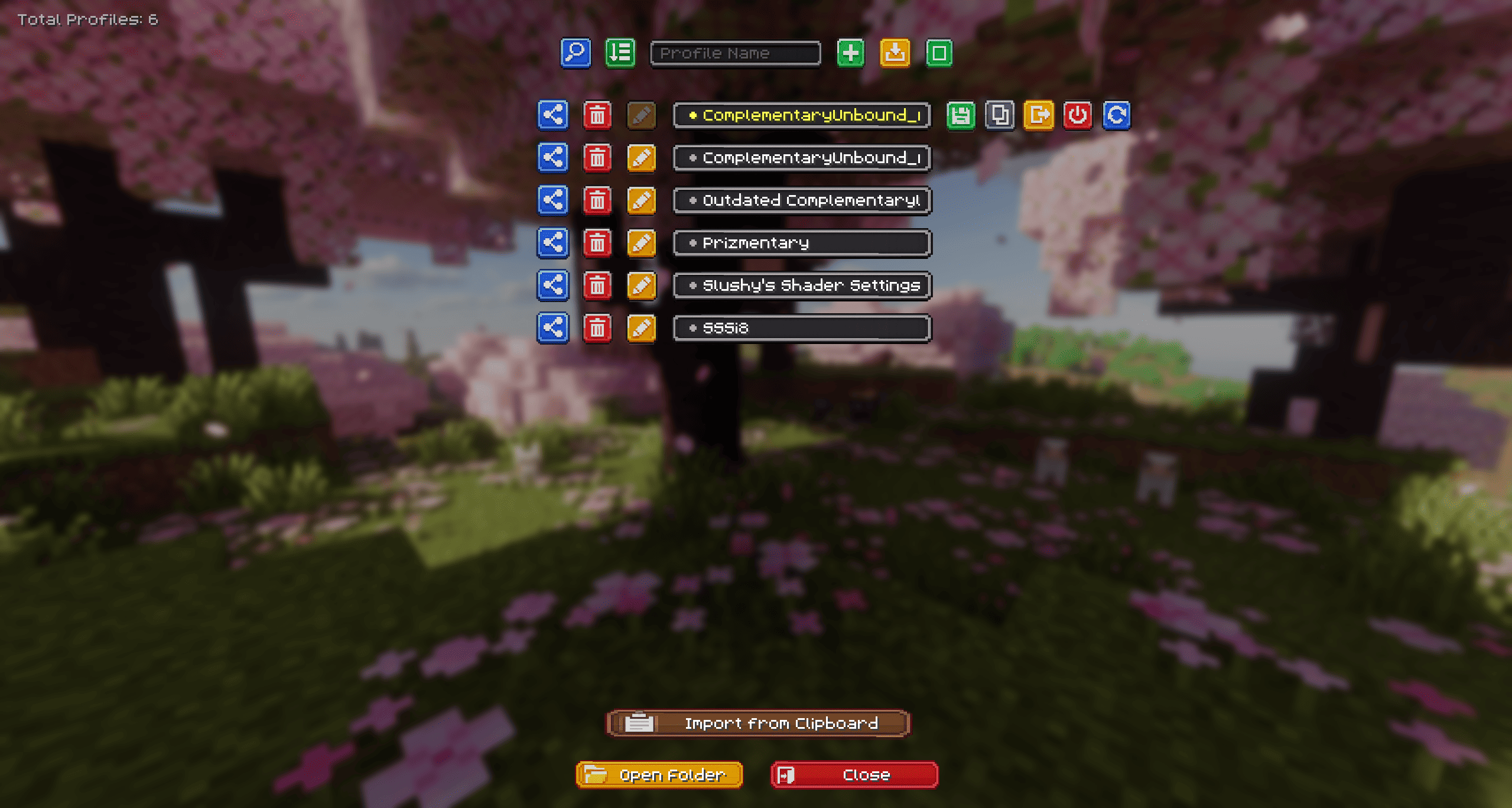
Why use Shader Profiles?
If you frequently change your shader settings based on your current activity—such as using highly demanding settings for taking cinematic screenshots, and performance-optimized settings for regular gameplay or combat—this mod eliminates the need to manually adjust individual sliders every time.
Features
- Cloud Integration (NEW): Instantly upload your configurations to the cloud (powered by mclo.gs) to generate a short link. You can send this link directly to the server chat with a single click to easily share it with your friends! You can also magically import profiles directly from a copied link in your clipboard.
- Smart Shader Detection (NEW): When importing a cloud profile, the mod deeply scans your
shaderpacksfolder and uses a smart fingerprinting system to automatically detect and select the correct matching shader, even if you changed the original.zipfile name. - Profile Comparison (NEW): Select exactly two profiles in multi-select mode to compare them. View every single configuration difference side-by-side using the built-in diff interface!
- Enhanced Custom UI (NEW): Features a polished, custom-textured interface with dynamic loading animations, colored feedback, and auto-scrolling marquee text, all integrating naturally into the existing Iris Shader Packs screen.
- Profile Management: Easily create, rename, duplicate, and delete distinct configuration profiles for any installed shader pack.
- Quick Switch: Change active shader profiles instantly directly from the shader selection menu.
- Local Import & Export: Share your tailored configurations by exporting single
.txtfiles or bulk-exporting via.ziparchives. You can easily import these local files back into the game. - Bulk Actions: Utilize the multi-select mode to delete several profiles at once or export them as a batch.
Technical Details & Dependencies
- Client-Side Only: This mod operates entirely on the client. It does not need to be installed on servers for you to use it in multiplayer.
- Requirements:
- Fabric API
- Iris Shaders
How to Use
- Navigate to
Video Settings>Shader Packsand select a shader. - Open the
Shader Pack Settingsmenu. - Click the new
Profilesbutton located in the top-left corner. - From this interface, you can create, modify, share, and manage your custom configurations.
- Keybind: Press the assigned hotkey (default: O) while in-game for instant access. You can change this in the standard Minecraft
Controlsmenu under the Shader Profiles category.
Versions
FAQ
How do I install Shader Profiles?
Download the file for your Minecraft version and loader from this page, then drop the .jar into your mods (or plugins) folder and launch the game.
Is Shader Profiles free?
Shader Profiles is free to download on Modgrid — we link straight to the official source, no paywall or bundled installer.
Which Minecraft versions does Shader Profiles support?
Works with Fabric. Supports versions 1.21.1–26.1.2. See the download section on this page for the full list of supported versions and loaders.
Comments 0
No comments yet. Be the first to share your thoughts.