
Shifty Hotbar
ModrinthA utility mod that implements the hotbar shifting ability, inspired by Stardew Valley.

Shifty Hotbar





A fully client-side utility mod that implements the hotbar shifting ability, inspired by Stardew Valley.
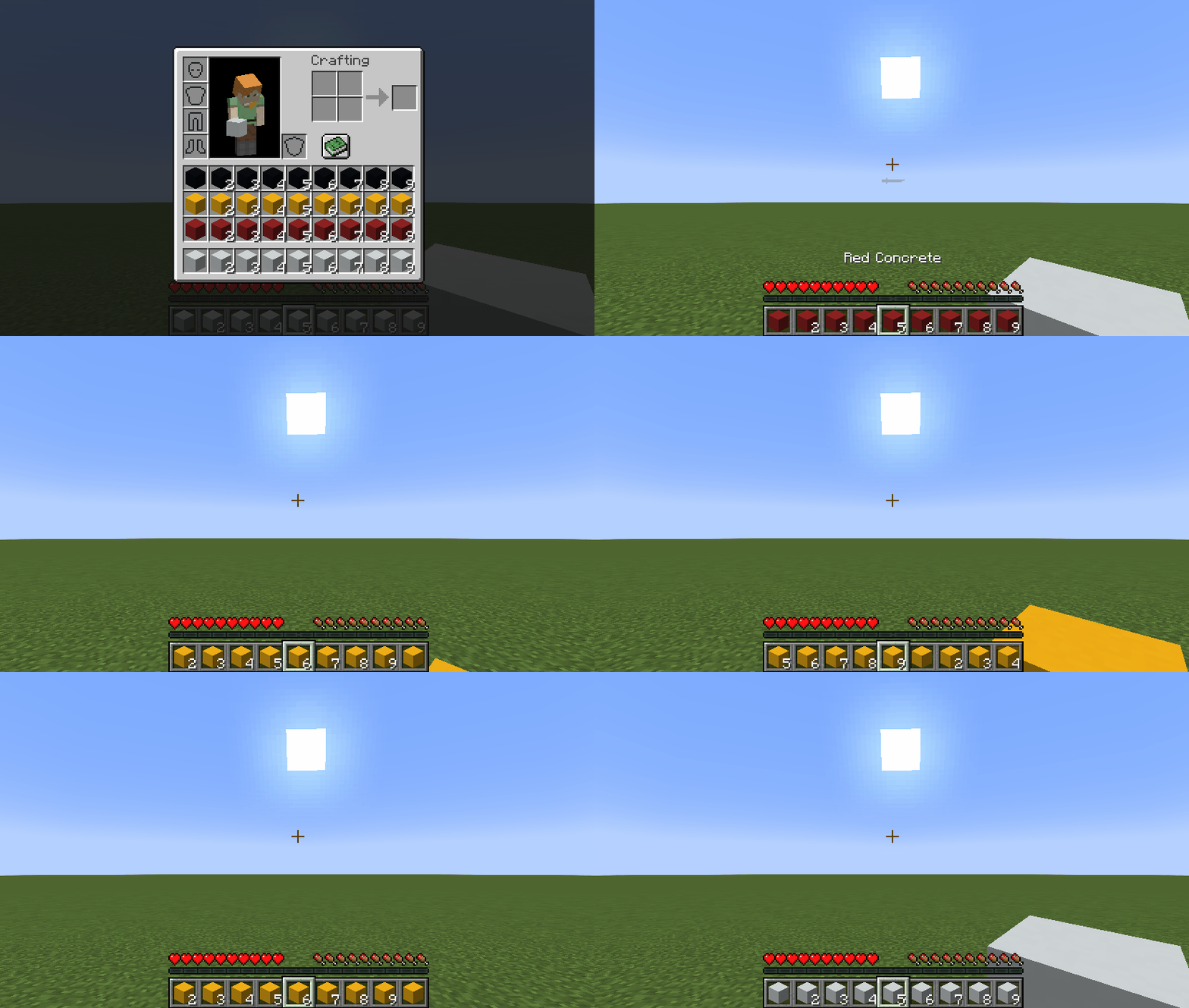
I know that there are mods like this in the wild, but none of them did suit me whatsoever. Therefore, I made the ultimate version that consists of every feature a mod like this can possibly provide:
- You can shift inventory rows in both directions (
Up ArrowandDown Arrowby default) - You can shift inventory columns in both directions (
Right ArrowandLeft Arrowby default) - You can shift slots in your hotbar in both directions
- You can shift slots in the selected column in both directions
- You can shift rows, columns and slots via mouse scroll while pressing a
modifierkey (Left Altby default) - You can quickly shift to a row, a column, or a slot via hotbar hotkeys (
1...9) while pressing amodifierkey (Left Altby default)
Key Binds
Key binds can be configured just like vanilla ones:
- Go to
Options... - Select
Controls... - Then choose
Key Binds... - Scroll down to the
Shifty Hotbarsection
| Name | Description | Default |
| ---- | ----------- | ------------- |
| Row modifier | When pressed, it allows you to shift rows instead of choosing a slot via mouse scroll/hotkeys (1...9) | Left Alt |
| Previous row | Shifts all rows in your inventory so that the topmost row in your inventory becomes the hotbar | Down Arrow |
| Next row | Shifts all rows in your inventory so that the row above your hotbar becomes the hotbar | Up Arrow |
| Row-in-column modifier | When pressed, it allows you to shift slots in the selected column instead of choosing one via mouse scroll | |
| Previous row-in-column | Shifts all slots in the selected column so that the topmost slot in your inventory becomes the hotbar slot | |
| Next row-in-column | Shifts all slots in the selected column so that the slot above your hotbar slot becomes the hotbar slot | |
| Column modifier | When pressed, it allows you to shift columns instead of choosing a slot via mouse scroll/hotkeys (1...9) | |
| Previous column | Shifts all columns in your inventory so that the slot before your selected slot becomes the selected slot | Left Arrow |
| Next column | Shifts all columns in your inventory so that the slot after your selected slot becomes the selected slot | Right Arrow |
| Column-in-row modifier | When pressed, it allows you to shift slots in the hotbar instead of choosing one via mouse scroll | |
| Previous column-in-row | Shifts all slots in your hotbar so that the slot before your selected slot becomes the selected slot | |
| Next column-in-row | Shifts all slots in your hotbar so that the slot after your selected slot becomes the selected slot | |
Config
If you have Cloth Config installed, you can customize the behavior of the mod. A config is usually located at ./config/shifty_hotbar.json and by default looks like this:
{
  "invertRowScroll": false,
  "invertColumnScroll": false
}
| Name | Description | Default value |
| ---- | ----------- | ------------- |
| invertRowScroll | Inverts mouse scroll when row or row-in-column modifier is pressed | false |
| invertColumnScroll | Inverts mouse scroll when column or column-in-row modifier is pressed | false |
You can edit any of these values directly in the config file or via ModMenu.
Installation
Requirements:
- Minecraft
>=1.14.x - Fabric Loader
>=0.7.0 - Fabric API
>=0.25.0
You can download the mod from:
- GitHub Releases (recommended)
- Modrinth
- CurseForge
- GitHub Actions (these builds may be unstable, but they represent the actual state of the development)
Building from sources
Requirements:
- JDK
17
Linux/MacOS
git clone https://github.com/Kir-Antipov/shifty-hotbar.git
cd shifty-hotbar

chmod +x ./gradlew
./gradlew build
cd build/libs
Windows
git clone https://github.com/Kir-Antipov/shifty-hotbar.git
cd shifty-hotbar

gradlew build
cd build/libs
Versions
FAQ
Comment installer Shifty Hotbar ?
Téléchargez le fichier pour votre version de Minecraft et votre loader sur cette page, puis placez le .jar dans le dossier mods (ou plugins) et lancez le jeu.
Shifty Hotbar est-il gratuit ?
Shifty Hotbar est gratuit sur Modgrid — nous renvoyons directement vers la source officielle, sans paywall.
Quelles versions de Minecraft Shifty Hotbar prend-il en charge ?
Compatible avec Fabric. Prend en charge les versions 1.14–1.20.4. La liste des versions et loaders pris en charge est dans la section de téléchargement de cette page.
Commentaires 0
Aucun commentaire pour l'instant. Sois le premier à donner ton avis.