Show Me What You Got
ModrinthAllows displaying your items in chat. Brag about your cool equipment!
Show Me What You Got
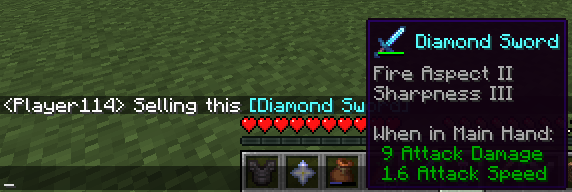
A simple mod which allows displaying your items to other users in chat.
While in your inventory, hold ctrl and then press your chat key while hovering over an item to share it. (so Ctrl+T by default).
Your chat window will open with the linked item inside. Feel free to write a message before or after the item (or both) before sending!
Client or Server?
The mod should be installed on the client and the server in order to function properly.
Clients without the mod can still see items shared by others with the mod in chat, but can't share items themselves and also won't see the shared item's texture in the tooltip. If you use this mod on your client and try to share an item on a server without the mod installed, you will just send text with the item name.
Versions
FAQ
Comment installer Show Me What You Got ?
Téléchargez le fichier pour votre version de Minecraft et votre loader sur cette page, puis placez le .jar dans le dossier mods (ou plugins) et lancez le jeu.
Show Me What You Got est-il gratuit ?
Show Me What You Got est gratuit sur Modgrid — nous renvoyons directement vers la source officielle, sans paywall.
Quelles versions de Minecraft Show Me What You Got prend-il en charge ?
Compatible avec Fabric, Quilt. Prend en charge les versions 1.17–1.21.3. La liste des versions et loaders pris en charge est dans la section de téléchargement de cette page.
Commentaires 0
Aucun commentaire pour l'instant. Sois le premier à donner ton avis.