
Spear Config
ModrinthA plugin that provides various customizations for the spear on SMPs.

One polished control surface for every vanilla spear on Paper and compatible forks.



| Tier-aware limits | Combat controls | Enchantment policy | Wielder awareness |
| --- | --- | --- | --- |
| Seven independently enabled crafting caps with blocked-recipe feedback | Separately enabled Paper-native jab and lunge cooldowns | Runtime-discovered allow-list and maximum levels | Colored glow, tab names, dropped items, and position broadcasts |
| Online inventory, ender chest, and nested-shulker recounting | Natural mob spear-drop suppression | Enchanting-table and anvil enforcement | A vertically and horizontally balanced 45-slot GUI |
See it in action
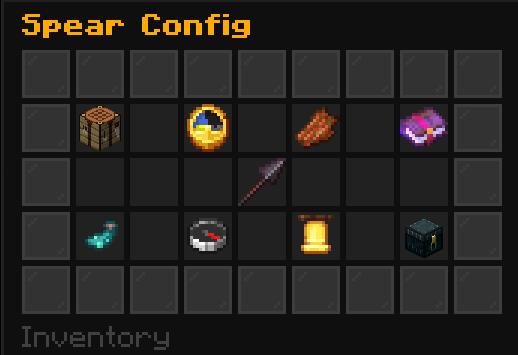
Configure everything in one centered menu
Eight mirrored categories keep every setting within a predictable click path.
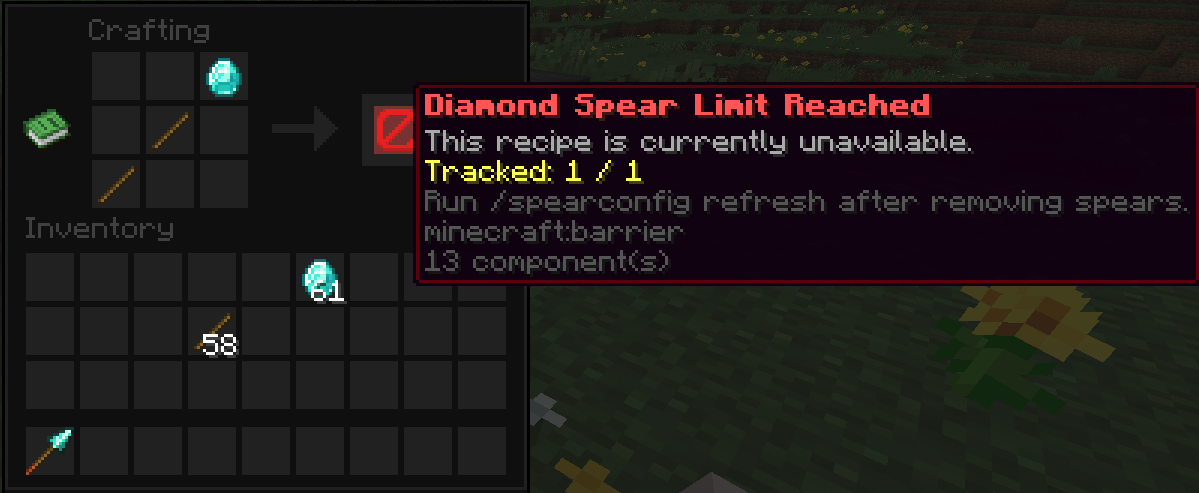
Stop crafting cleanly at each tier limit
The recipe result becomes an explanatory barrier, while the craft event remains protected against bypasses.
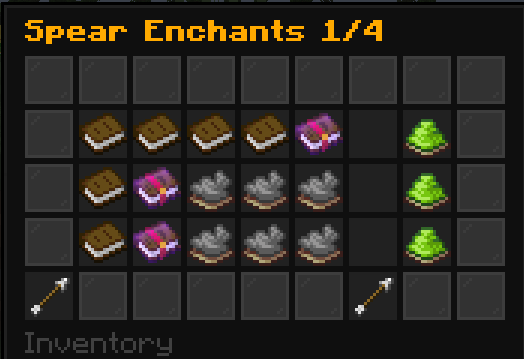
Control only the enchantments Paper says are valid
Compatible enchantments are discovered from the running server and presented as readable, paginated book rows with individual allow and exact-level controls.
Reveal current spear owners
Optional interval broadcasts show each inventory owner's name, dimension, and coordinates.

Install
- Install Paper, Purpur, or another server fork that preserves compatibility with the Paper 26.1 API.
- Download Spear Config from Modrinth.
- Drop the downloaded jar into the server's
plugins/folder. - Start or restart the server, then edit
plugins/SpearConfig/config.ymlif desired.
Supported platforms: Paper and Paper-compatible downstream forks, including Purpur, on server versions 26.1–26.2 with Java 25. Spear Config is packaged as a Bukkit-style plugin, but its combat and registry features use Paper-only APIs; plain CraftBukkit and Spigot are therefore not supported.
Use
- Give administrators
spearconfig.admin; operators receive it by default. - Run
/spearconfig guito open the symmetric settings menu. Click a numeric item, type an exact non-negative integer in chat, or typecancel; the same page reopens automatically. - Set a tier's number with
/spearconfig set limit <tier> <amount>, then independently enable or disable enforcement with/spearconfig toggle limit <tier>. Valid tiers arewood,stone,copper,iron,gold,diamond, andnetherite. An enabled amount of0blocks every craft; a disabled limit is unlimited. - Set a combat delay with
/spearconfig set cooldown <jab|lunge> <seconds>, then control its master switch with/spearconfig toggle cooldown <jab|lunge>. A value of0is a real zero-second delay and does not change the switch. - Use
/spearconfig toggle <setting>forblockmobdrop,enchantable,glow,tab, orreveal. Use/spearconfig toggle announcements <chat|title>for the two independent announcement channels;/spearconfig toggle announcementssets both together. - Configure the shared visual color with
/spearconfig set color <color>and the reveal task with/spearconfig set revealinterval <seconds>. The reveal minimum is 5 seconds. - Manage the dynamic enchantment policy with
/spearconfig whitelist add|remove|listand/spearconfig enchantlevel <enchantment> <max-level>. The GUI groups three readable enchantment rows per page and places the master enchanting switch on the last page. - Run
/spearconfig refreshto recount, or/spearconfig reloadafter editingconfig.yml.
The root command also accepts /spearcfg and /scconfig. Every command and argument supports tab completion.
The default configuration enables mob-drop blocking, spear enchanting, chat announcements, and title announcements. Every craft-limit and cooldown master switch starts disabled with a value of 0; the shared color is gold, position reveals run every 300 seconds when enabled, and compatible enchantments start allowed at their natural maximum levels.
Tip: Upgrading from 0.1 automatically migrates scalar limits, cooldowns, and the former announcement switch. Existing positive values become enabled; existing zero values become disabled with a retained value of zero. A refresh scans online player inventories, their ender chests, and nested shulker boxes, but not offline players or arbitrary world containers.
Build from source
Requires JDK 25. The 26.1 and 26.2 APIs are binary-compatible neighbors, so one build targets the full supported range:
./gradlew clean build
On Windows PowerShell:
.\gradlew.bat clean build
The distributable jar is written to build/libs/SpearConfig-<version>.jar. The build does not create a sources jar.
GPL-3.0-only · 2026 · NullKeeper-dev
Versions
FAQ
Comment installer Spear Config ?
Téléchargez le fichier pour votre version de Minecraft et votre loader sur cette page, puis placez le .jar dans le dossier mods (ou plugins) et lancez le jeu.
Spear Config est-il gratuit ?
Spear Config est gratuit sur Modgrid — nous renvoyons directement vers la source officielle, sans paywall.
Quelles versions de Minecraft Spear Config prend-il en charge ?
Compatible avec Paper, Purpur. Prend en charge les versions 26.1–26.2. La liste des versions et loaders pris en charge est dans la section de téléchargement de cette page.
Commentaires 0
Aucun commentaire pour l'instant. Sois le premier à donner ton avis.