
探囊取物(Su's Instant Swap)
Modrinth一键拿取背包物品 / Get an inventory item with one keypress
探囊取物 / Su's Instant Swap
一键交换手中物品,不再需要打开物品栏拖放,省时省力。
One key, instant item swap. No more opening inventory and dragging items with the mouse.
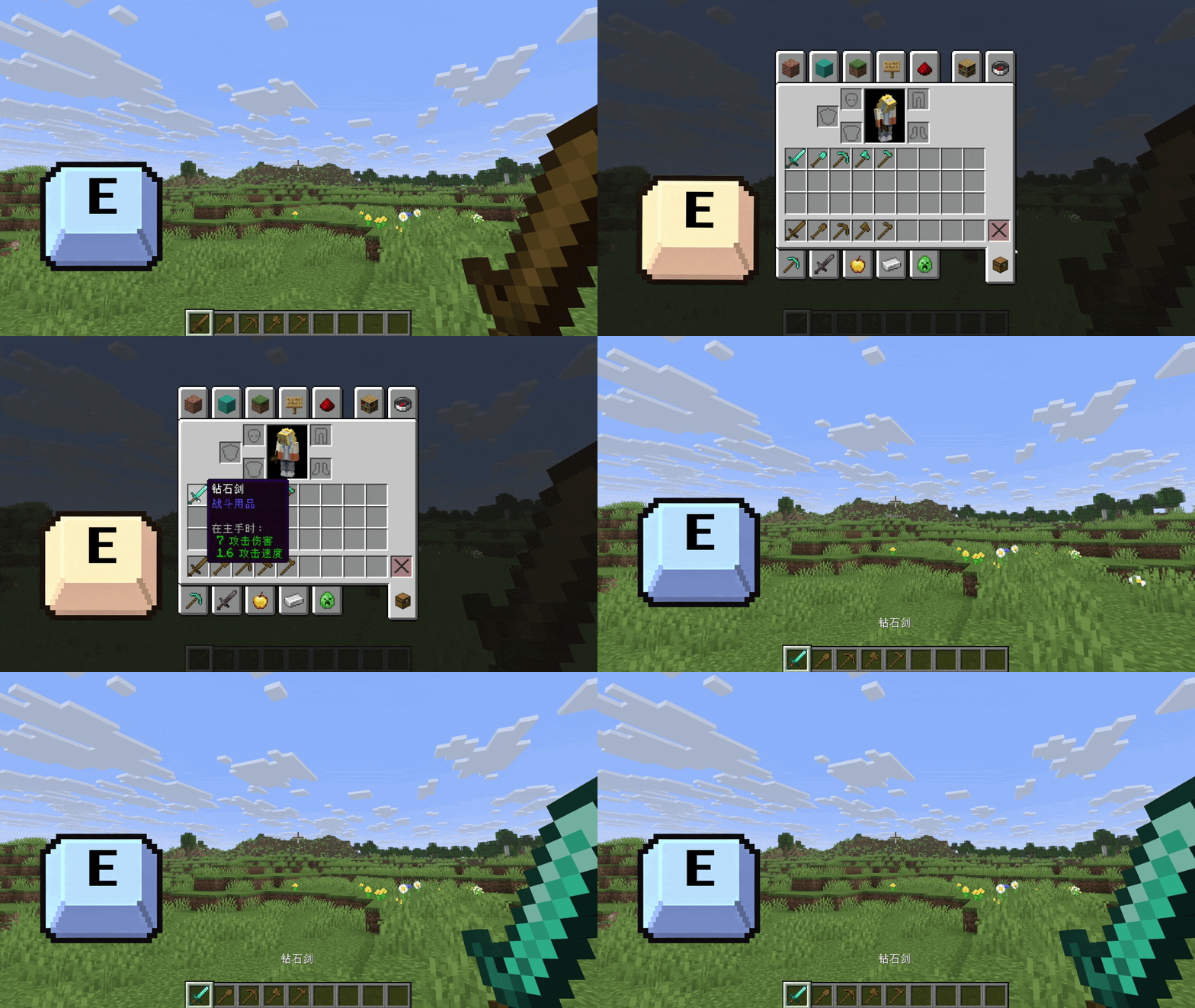
使用方式 / How to use
你可以使用两种方式快速把物品栏中的物品交换到手上
You can use one of two methods to quickly swap an item from your hotbar/inventory into your hand.
一键交换模式:
Instant swap mode:
-
按住
E键(跟随原版的开关物品栏按键)
Hold theEkey (the vanilla inventory key) -
物品栏界面出现(如此时松开按键,界面将关闭)
The inventory panel appears (if you release the key now, the panel closes) -
鼠标悬停在目标物品上
Hover your mouse over the desired item -
松开
E键执行交换,物品栏自动关闭
Release theEkey to perform the swap, the panel closes automatically
界面内交换模式:
In‑GUI swap mode:
-
在物品栏或其他存储界面中(理论上兼容其他模组)
In the inventory or other storage GUI (theoretically compatible with other mods) -
鼠标悬停在目标物品上
Hover your mouse over the desired item -
短按
E键(可自定义)执行交换,物品栏自动关闭
Tap theEkey (customizable) to perform the swap, the panel closes automatically
键位设置 / Keybinding
即时交换键和界面内交换键都自动绑定为开关物品栏键。
Both the instant swap key and the in‑GUI swap key are automatically bound to the vanilla inventory key.
界面内交换键可以单独修改。
The in‑GUI swap key can be set separately.
配置文件 / Configuration
你可以在游戏内模组配置中修改如下内容(Fabric 版需要 Mod Menu,否则需要自行到 config 文件夹中修改):
You can change the following options in the in‑game mod configuration (Fabric version requires Mod Menu; otherwise edit the config file directly in the config folder):
-
模组开关 – 如果关闭,则模组完全关闭。默认开启。
Mod toggle – If disabled, the whole mod is turned off. Default: ON. -
长按判定阈值 – 用于区分长按和短按,可设定为 50-1000 毫秒。默认 200 毫秒。
Long press threshold – Used to distinguish between long and short presses, adjustable from 50 to 1000 ms. Default: 200 ms. -
交换音效 – 用于开关交换物品的音效。默认开启。
Swap sound – Enable/disable the sound when swapping items. Default: ON. -
鼠标重定位 – 在打开物品栏界面时,鼠标会自动移动到 UI 右下角避免遮挡。默认开启。
Mouse reposition – When opening the inventory panel, the mouse automatically moves to the bottom‑right corner to avoid blocking the view. Default: ON. -
界面内交换 – 如果关闭,则无法在物品栏界面内按键交换物品。默认关闭(防止误触)。
Swap inside GUI – If disabled, you cannot swap by pressing the key while the inventory panel is open. Default: OFF (prevents accidental swaps). -
空位交换 – 开启后,允许和空位进行交换。默认关闭。
Swap with empty slots – When enabled, allows swapping with empty slots. Default: OFF.
其他说明 / Additional Info
-
非常推荐和 InvMove 一起使用,打开物品栏将不会影响你的行走,体验更丝滑。
Highly recommended to use together with InvMove – opening the inventory will not affect your movement, for a smoother experience. -
低于 2.0.0 的版本存在较多问题,建议使用 2.0.0 及以上版本。
Versions below 2.0.0 have many issues; it is recommended to use 2.0.0 or later. -
模组为纯客户端,可在未安装该模组的服务器上使用,但请务必与服主确认,自行承担反作弊风险。
Pure client‑side mod – works on servers without the mod, but always check with your server admin. Use at your own risk regarding anti‑cheat. -
模组完全由 AI 开发,如果遇到 BUG,请到 GitHub 提交问题。
Developed entirely by AI. Please report bugs on GitHub. -
开源协议:LGPL 3.0
License: LGPL 3.0
Commentaires 0
Aucun commentaire pour l'instant. Sois le premier à donner ton avis.