
wckdDCLink
ModrinthBridge your Minecraft and Discord chat with WDCL
3 downloads 1 followers updated 18d ago
wckdDCLink
Bridge your Minecraft chat to Discord and viceversa!
Features
- Discord > Minecraft Linking
- Minecraft > Discord Linking via Required Linking
- Link Embeds
- Discord Roles Sync
- Data Migration from DiscordSRV
- MiniMessage Support
- Join/Leave Message
- Join/Leave suppression if not linked
Preview
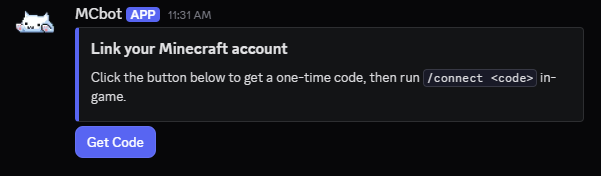
Link Embed

Files
Config Version 2
# Bot token; from https://discord.com/developers/applications -> your app -> Bot -> Reset Token
# You must restart your server after changing this option
BotToken: ""

# The Discord server (guild) ID this bot operates in
GuildId: ""

# Channel routing for every message type this plugin can post.
# syntax is Channels: {"type": "numerical channel ID from Discord", "another type": "another channel ID"}
#
# Every message type below will go to "global" unless that specific type has its own
# entry defined. Leave a type's entry out entirely (or blank) to have it fall back to "global".
#
# Types:
#   global   - chat bridge, and the fallback for every other type below
#   join     - join messages
#   leave    - quit messages
#   awards   - advancement messages
#   deaths   - death messages
#   watchdog - lag/hang alerts
#   server   - server start/stop announcements
#   link     - staff-only: where link/unlink confirmations post, for admin visibility
#              into who's linked to whom. NOT where /link can be used - see
#              LinkRequestChannelId further down for that.
#
# Run "/dclink reload" after changing this option to apply
Channels: {"global": ""}

# Console channel numerical ID (NOT name), leave blank to disable the console channel entirely.
# Deliberately NOT part of the Channels map above or command-executable from Discord - see
# the Security section in README.md for why.
ConsoleChannelId: ""

# ─────────────────────────────────────────────────────────────────────────
#  Chat bridge
#
#  ChatBridgeEnabled: whether to bridge chat at all
#  ChatBridgeMinecraftToDiscordFormat: {player} {message} - only used when
#    ChatBridgeUseWebhook is false (bot posts a formatted line instead)
#  ChatBridgeDiscordToMinecraftFormat: {name} {message} - MiniMessage or legacy
#    (&a) both work, auto-detected
#  ChatBridgeUseWebhook: have chat messages post AS the player.
#  Requires MESSAGE CONTENT INTENT enabled for this bot in the Discord Developer
#  Portal (Bot -> Privileged Gateway Intents), or the bot will fail to start.
# ─────────────────────────────────────────────────────────────────────────
ChatBridgeEnabled: true
ChatBridgeMinecraftToDiscordFormat: "**{player}**: {message}"
ChatBridgeDiscordToMinecraftFormat: "<blue>[Discord]</blue> <white>{name}</white><gray>: </gray><white>{message}</white>"
ChatBridgeUseWebhook: false

# ─────────────────────────────────────────────────────────────────────────
#  Join/leave/advancement/death embeds
#
#  {Join,Leave,Death,Advancement}EmbedColor: hex, no "#", used only when
#    AnnouncementsUseEmbeds is true.
# ─────────────────────────────────────────────────────────────────────────
AnnouncementsUseEmbeds: true
JoinEmbedColor: "57F287"
LeaveEmbedColor: "ED4245"
DeathEmbedColor: "992D22"
AdvancementEmbedColor: "FEE75C"

# ─────────────────────────────────────────────────────────────────────────
#  Join/leave messages
#
#  JoinQuitEnabled: whether to post join/leave messages at all
#  JoinFormat / QuitFormat: {player}
# ─────────────────────────────────────────────────────────────────────────
JoinQuitEnabled: true
JoinFormat: "**{player}** joined the server"
QuitFormat: "**{player}** left the server"

# ─────────────────────────────────────────────────────────────────────────
#  Advancement (awards) messages
# ─────────────────────────────────────────────────────────────────────────
AdvancementsEnabled: true
AdvancementFormat: "**{player}** has made the advancement **{advancement}**"

# ─────────────────────────────────────────────────────────────────────────
#  Death messages
#
#  DeathFormat: {player} / {deathMessage} - deathMessage is the full vanilla
#  death line ("Player was slain by Zombie"), so {player} is usually redundant
#  unless you want to bold/mention them separately from the vanilla text.
# ─────────────────────────────────────────────────────────────────────────
DeathsEnabled: true
DeathFormat: "\u2620\ufe0f {deathMessage}"

# ─────────────────────────────────────────────────────────────────────────
#  Server start/stop announcements
# ─────────────────────────────────────────────────────────────────────────
ServerStartStopEnabled: true
ServerStartMessage: "🟢 Server has started."
ServerStopMessage: "🔴 Server is shutting down."

# ─────────────────────────────────────────────────────────────────────────
#  Server watchdog
#
#  Monitors the time since your server's last game tick.
#
#  WatchdogEnabled: whether the watchdog is enabled at all
#  WatchdogTimeoutSeconds: seconds since the last tick before alerting (minimum 10)
#  WatchdogMessageCount: how many times the alert repeats, in case you really
#    want to make sure you catch it
# ─────────────────────────────────────────────────────────────────────────
WatchdogEnabled: true
WatchdogTimeoutSeconds: 30
WatchdogMessageCount: 3

# ─────────────────────────────────────────────────────────────────────────
#  Console mirror
#
#  ConsoleEnabled: whether the console mirror is on at all
#  ConsoleMinLevel: INFO, WARN, or ERROR (Log4j level names) - only log records
#    at/above this level get mirrored
#  ConsoleFlushIntervalSeconds: how often buffered lines get sent as a batch
# ─────────────────────────────────────────────────────────────────────────
ConsoleEnabled: true
ConsoleMinLevel: "WARN"
ConsoleFlushIntervalSeconds: 5

# ─────────────────────────────────────────────────────────────────────────
#  Account linking
#
#  LinkedFormat / UnlinkedFormat: {player} / {discordId} - posted to the
#    "link" channel in the Channels map above (staff-only visibility log)
#  LinkRequestChannelId: where /link and the "Get Code" button can be used.
#    Leave blank to allow /link from any channel. This is a SEPARATE
#    channel from the "link" entry in the Channels map above - that one is
#    a staff-only log of who's linked to whom, this one is where players
#    actually go to request a code.
#  CodeLength / CodeExpiryMinutes / CooldownSeconds: how link codes behave
#  ButtonId: component ID for the "Get Code" button posted by /postlinkembed
#  EmbedColor / EmbedThumbnailUrl / EmbedImageUrl: styling for that embed
# ─────────────────────────────────────────────────────────────────────────
LinkEventsEnabled: true
LinkedFormat: "\u2705 **{player}** linked to <@{discordId}>"
UnlinkedFormat: "\u274c **{player}** unlinked their Discord account"
LinkRequestChannelId: ""

CodeLength: 6
CodeExpiryMinutes: 15
CooldownSeconds: 30

ButtonId: "dclink_getcode"
EmbedColor: "5865F2"
EmbedThumbnailUrl: ""
EmbedImageUrl: ""

AutoDeleteEnabled: true
AutoDeleteButtonReplySeconds: 15

ConnectAttemptLimiterEnabled: true
ConnectAttemptLimiterMaxAttempts: 5
ConnectAttemptLimiterWindowSeconds: 60
ConnectAttemptLimiterLockoutSeconds: 60

# Hide join/quit messages IN-GAME for players who haven't linked yet.
SuppressJoinQuitUntilLinked: false

# ─────────────────────────────────────────────────────────────────────────
#  Booster detection
#
#  Detection/placeholder only right now Requires SERVER MEMBERS INTENT
#  enabled for this bot in the Discord Developer Portal.
# ─────────────────────────────────────────────────────────────────────────
BoosterDetectionEnabled: true

# ─────────────────────────────────────────────────────────────────────────
#  Role sync
#
#  RoleSyncEnabled: whether role sync is on at all
#  RoleSyncIntervalMinutes: how often to re-apply Minecraft groups -> Discord
#    roles as a safety net, on top of the real-time sync that happens on
#    every change
#  RoleSyncGroupToRole: luckperms_group_name: "discord_role_id" pairs
# ─────────────────────────────────────────────────────────────────────────
RoleSyncEnabled: false
RoleSyncIntervalMinutes: 10
RoleSyncGroupToRole:
  # admin: "123456789012345678"
  # donator: "123456789012345679"

# ─────────────────────────────────────────────────────────────────────────
#  Nickname sync (Minecraft -> Discord only)
#
#  Sets a linked player's Discord nickname to match their Minecraft name.
#  Per-player opt-out via the "wckddclink.nicknamesync" permission
#  (granted by default).
#
#  NicknameSyncEnabled: whether nickname sync is on at all
#  NicknameSyncCycleMinutes: minutes between re-applying nicknames for all
#    online linked players, on top of the real-time sync that happens on
#    link and on join
#  NicknameSyncFormat: the nickname format (keep it under 32 characters -
#    Discord's own limit - it gets truncated if you go over)
#    %displayname% - player's display name
#    %username%    - player's username
#    PlaceholderAPI placeholders are also supported
# ─────────────────────────────────────────────────────────────────────────
NicknameSyncEnabled: false
NicknameSyncCycleMinutes: 3
NicknameSyncFormat: "%username%"

# ─────────────────────────────────────────────────────────────────────────
#  Ban sync
#
#  Mirrors bans between Minecraft and Discord for linked accounts. Each
#  direction is independently toggled. Requires GUILD_MODERATION intent
#  (not privileged, added automatically) for the Discord -> Minecraft
#  direction.
#
#  BanSyncMinecraftToDiscord: ban a linked player's Discord account when
#    they get banned on the Minecraft server
#  BanSyncDiscordToMinecraft: ban a linked player on the Minecraft server
#    when their Discord account gets banned
#  BanSyncDiscordToMinecraftReason: the ban reason shown on the Minecraft
#    side when a Discord ban is mirrored over
# ─────────────────────────────────────────────────────────────────────────
BanSyncMinecraftToDiscord: false
BanSyncDiscordToMinecraft: false
BanSyncDiscordToMinecraftReason: "&cYou have been banned until further notice because you were banned on our Discord server."

# ─────────────────────────────────────────────────────────────────────────
#  Require linked account to play
#
#  IMPORTANT: because our linking flow normally starts in Discord (/link
#  there, then /connect in-game), a player denied here could never run
#  /connect. So an unlinked player gets a FRESH code generated right in
#  their kick message instead - no in-game step needed - and completes
#  linking by sending that code straight to the bot in a DM. Requires
#  DIRECT_MESSAGES + MESSAGE_CONTENT intents (added automatically when
#  this is enabled) - MESSAGE_CONTENT is privileged, enable it in the
#  Discord Developer Portal if it isn't already (needed for ChatBridge too).
#
#  LinkingGateEnabled: whether the gate is on at all
#  LinkingGateRequiredRoleId: a Discord role ID a linked account must also
#    hold to be let in (Twitch-sub-style). Leave blank to only require
#    being linked, no role check.
#  LinkingGateBypassNames: Minecraft usernames that always get in regardless
#  LinkingGateWhitelistedPlayersBypass: whether being on the server's
#    vanilla whitelist is enough to skip this check entirely
#  LinkingGateNotLinkedMessage / NotSubscriberMessage / StartingMessage: kick
#    messages. Not-linked supports {BOT} (bot name), {CODE} (their fresh
#    verification code), {INVITE} (LinkingGateInviteLink below)
#  LinkingGateInviteLink: your Discord server's invite link, shown in the
#    not-linked kick message
# ─────────────────────────────────────────────────────────────────────────
LinkingGateEnabled: false
LinkingGateRequiredRoleId: ""
LinkingGateBypassNames: []
LinkingGateWhitelistedPlayersBypass: true
LinkingGateNotLinkedMessage: "&7You must link your &9Discord&7 account to play.\n\n&7Send a DM to &b{BOT}&7 containing just &b{CODE}&7 to link your account.\n\n&7Discord Invite \u00bb &b{INVITE}"
LinkingGateNotSubscriberMessage: "&cYou're linked, but you don't have the required Discord role to play yet."
LinkingGateStartingMessage: "&cStill connecting to Discord to check your link status - try again in a minute."
LinkingGateInviteLink: ""
Messages
Discord:
  Cooldown: "You're requesting codes too fast - please wait a bit and try again."
  AlreadyLinked: "This Discord account is already linked to a Minecraft account."
  CodeMessage: "Your code is **{code}**. In-game, run `/connect {code}` within {expiry} minutes."
  WrongChannel: "Please use {channel} to request a link code."
  EmbedTitle: "Link your Minecraft account"
  EmbedDescriptionWithButton: "Click the button below to get a one-time code, then run `/connect <code>` in-game."
  ButtonLabel: "Get Code"
  LinkedConfirmation: "You're now linked to **{player}**! Chat bridge and role sync (if enabled) are active for this account."

Minecraft:
  PlayersOnly: "&cOnly players can use this command."
  ConnectUsage: "&cUsage: /connect <code>"
  ConnectLockedOut: "&cToo many failed attempts. Try again in {seconds}s."
  InvalidOrExpiredCode: "&cThat code is invalid or has expired. Request a new one in Discord."
  AlreadyLinked: "&cYou're already linked to a Discord account."
  LinkSuccess: "&aYour account is now linked to Discord!"
  RdclUsage: "&cUsage: /dclink reload"
  RdclReloaded: "&aDCLink configuration reloaded."
  PostEmbedUsage: "&cUsage: /postlinkembed [channelId] (or set LinkChannelId in config.yml)"
  PostedWithButton: "&aPosted the link embed."
  ChannelNotFound: "&cThat channel wasn't found - check the ID and that the bot can see it."
  PostEmbedError: "&cFailed to post the embed - check the console for details."
Commands
- postlinkembed
- posts an embed onto the designated channel - connect
- used inside the game, lets players link their accounts - link - used in discord, gives the player the code needed for linking
- wdclink reload - reloads the plugin after config changes are done (Default: OP)
- wdclink migrate - used for migrating DiscordSRV data to WCDL (Default: OP)
- wdclink unlink - unlinks players (Default: OP)
- wdclink whois - gets the players linked discord ID and name (Default: OP)
- wdclink syncroles - forcibly sync players roles (Default: OP)
- wdclink boosters - gives out a list of players who boosted discord (Default: OP)
Permissions
- wdclink.admin - Access to admin commands (Default: OP)
- wdclink.nicknamesync - whether to sync a players names or not (Default)
Placeholders (Placeholder API)
- %wdclink_linked% - If Player is Linked or not (yes|no)
- %wdclink_did% - Player Discord ID
- %wdclink_dname% - Player Discord Username
- %wdclink_dtag% - Player Discord Display Name
- %wdclink_davatar% - Discord Avatar URL
- %wdclink_booster% - If Player is a Booster or not (yes|no)
Ongoing Features
- boosters (WIP, currently gives placeholders for admins to use for other plugins)
Versions
No version history available. Use the Download button to get the latest from the source.
FAQ
How do I install wckdDCLink?
Download the file for your Minecraft version and loader from this page, then drop the .jar into your mods (or plugins) folder and launch the game.
Is wckdDCLink free?
wckdDCLink is free to download on Modgrid — we link straight to the official source, no paywall or bundled installer.
Which Minecraft versions does wckdDCLink support?
Works with Paper, Purpur. Supports versions 26.2–26.2. See the download section on this page for the full list of supported versions and loaders.
Comments 0
No comments yet. Be the first to share your thoughts.